Quick Links
Astah UML Release Notes: 6.3 (November 26, 2010)
[System Environment for Mac OS X]
- Apple Computer, Inc. Java(TM) SE Runtime Environment version 1.6.0_20 or later
- Mac OS X 10.6.2 or higher
- Intel Processor
[Notes for Mac OS X]
- We test Astah on Mac OS X, however technical support is not provided for any issues arose during using Astah on Mac OSX
- [Ctrl] key mentioned in this Release Note indicates [Command] key in Mac OS X
[What's NOT supported in Mac OS X]
- Copying/Saving as EMF is not supported
- Images would not appear in the document generated by [Export RTF] on TextEdit
- While Aqua Look and Feel is applied, you can't move tabs sideways on Diagram Editor by dragging them
- Customize of Keybinds is not supported
- Model Version: 34
Astah files (.asta) are upward compatible. If the files have been edited by the newer model version of Astah, they cannot be opened in the older model version.
[System Environment]
- Sun Microsystems JDK 6 Update 16(JRE 6 Update 16) or later is required
- Astah UML no longer runs on JDK1.4 or JDK5
[Bundled Java version]
- JRE 6 Update 22
[New Functions]
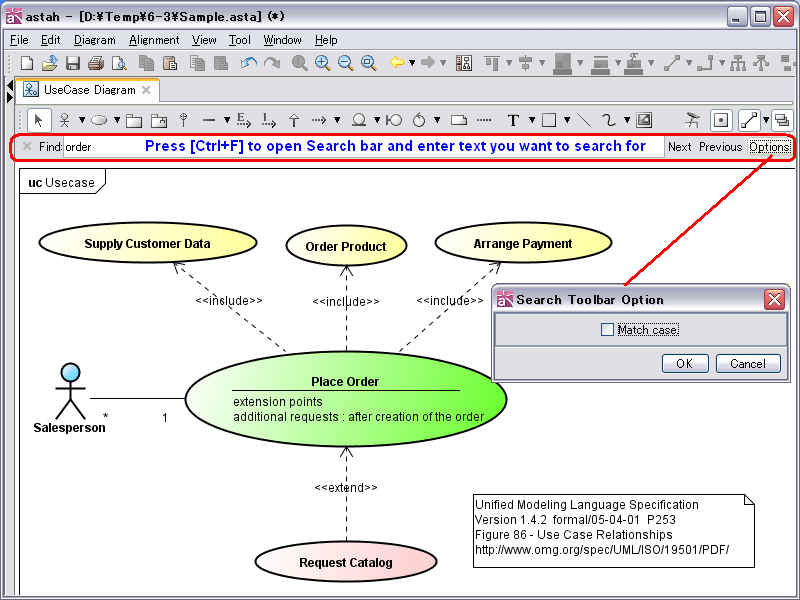
Search in Diagram
- Now you are able to directly search texts in Diagram (Search is not supported in UseCase Description, CRUD, Requirement Table)
- Search bar: Press [Ctrl + F] to open Search bar
- Search Box: Enter text you want to search for
- [Next] button: Move to next result (Shortcut key: Enter key)
- [Previous] button: Move to previous result (Shortcut key: Enter + Shift key)
- [Option] button: Open the option dialog
- Match Case: Default: OFF
- [X] button: Close the Search bar
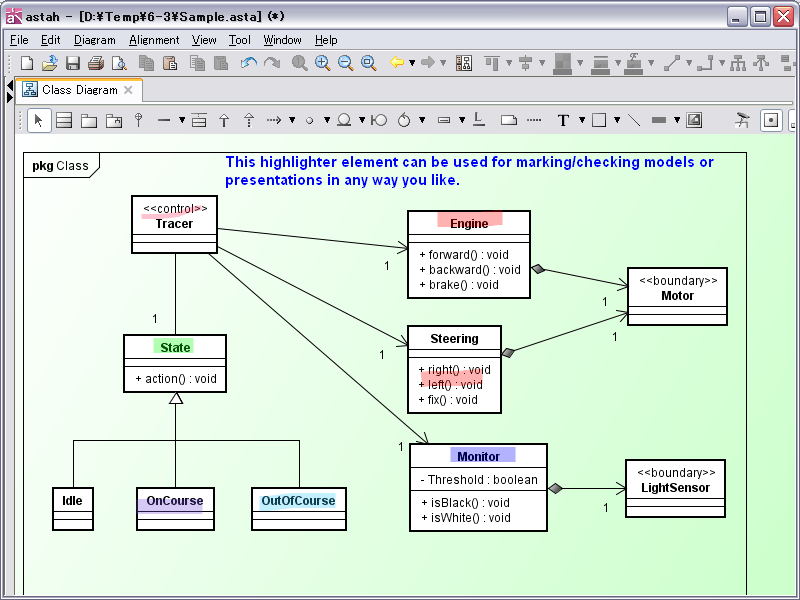
Highlighter is newly added
- Highlighter
- This highlighter element can be used for marking/checking models or presentations in any way you like
- Following style can be set for Highlighter
- Line Width: Default:15
- Alpha: Default: 0.3
- Line Type
- Color
- Diagrams that you can use Highlighter are as follows:
- Class Diagram, UseCase Diagram, Statemachine Diagram, Activity Diagram, Sequence Diagram, Communication Diagram, Component Diagram, Deployment Diagram, Composite Structure Diagram, Flowchart, Data Flow Diagra, ER Diagram, Mind Map, Requirement Diagram
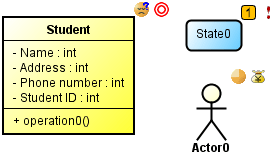
Add Mini Icons on models
- Now you are able to add Mini Icon on the right top corner of the models
- Method 1) Select a model in diagram and click the Mini icon you want to add from the Tool bar
- Method 2) Right-click on a model and select [Add Mini Icon] from its Pop-up menu
- New options in [System Properties] - [Mini Icon]
- Show Mini Icon on Diagram: Default: ON
- Show Mini Icon on printed documents: Default: OFF
- Show Mini Icon on exported images: Default: OFF
- Now Icons used for Mind Maps are called "Mini Icon" as well
- New Mini Icons are available as follows:
- Progress (100%, 75%, 50%, 25%, 0%, 80%, 60%, 40%, 20%)
- Progress2 (TODO, Doing, Done, TODO/Doing/Done with Image)
- You are able to add Mini icons to following models
In multiple diagrams commonly Model, Subsystem, Package, Note, Text, Interface, Entity, BusinessEntity, Boundary, Control, BusinessWorker, Instance Specification Class Diagram Class, Association Class UseCase Diagram Actor, UseCase Statemachine Diagram State, Submachine State Activity Diagram Action, Callbehavior Action, FlowFinal Node, SendSignalAction, AcceptEventAction, Object Node, Process, Connector Sequence Diagram Lifeline, Message Communication Diagram Lifeline, Message Component Diagram Component, Part, Classifier, Artifact Deployment Diagram Node, Node Instance, Component, Component Instance Composite Structure Diagram Structured Class, Part, Class, Association Class Flowchart Process Data Flow Diagram(DFD) External Entity, ProcessBox, DataStore ER Diagram ER Entity Requirement Diagram Requirement, TestCase
More models available for Suggest feature
- Mind Map: Topic
- Icon button appears when you put your mouse over topics
- Sequence Diagram: Synchronous Message / Asynchronous Message
- Icon button appears when you put your mouse over a lifeline, execution specification, InteractionUse or Frame
- Communication Diagram: Message
- Icon button appears when you put your mouse over a link only when the link is drawn in straight line, not curved type
Customizing Keybinds [NOT supported in Mac]
- You are able to customize shortcut keys to use in Astah as you like.
- [How to change the Shortcut keys]
- Close Astah
- Copy the "astah-key.properties_org" in Astah install folder to Userhome\.astah\professional and save it as "astah-key.properties"
- Open "astah-key.properties" and remove "#" from the line of Shortcut key you want to change and set the key value (xxx.key)
- Save the "astah-key.properties" and then restart Astah
- [Notes]
- Do not make duplicated keys
- By default, some different operations share the same Shortcut key(xxx.key), if you want to change one of them, make sure to change them all
- If you re-install Astah such as doing version up etc, please adjust the difference between the new "astah-key.properties_org" and your customized "astah-key.properties" file
- [How to change the Shortcut keys]
Change of Shortcut key
- Shortcut key to add Attributes is changed from Ctrl+F to Ctrl+R
Auto-scroll support while modifying texts in diagram
- Now Astah automatically scrolls while you are modifying texts in Diagram Editor
Improvements on Mind Map
- [Export PowerPoint] is available from any Topic from its Pop-up menu
- You are able to create Child topics to closed topics
More model can be created by double-clicking on diagram
- You are able to create a Part by double-clicking on structured class in Composite Structure Diagram
Converting to Text by copying & pasting texts from other applications or dragging & dropping the Mind Map Topic from the Structure Tree to diagrams is now available.
Improvement on Software Update and Node Count License (Windows only)
- [System Properties]-[Software Update and Node Count License]-[Use proxy settings from Internet Explorer (Only on Windows)]: Default: ON
Improvements on [Import Source Code] / [Export Source Code]
- Import Java
- If the Type of Attributes to import as Association is one of following, java.util.Collection (java.util.List, java.util.Set, java.util.Queue, or these child classes) or java.util.Map and its Child Class, it creates an Association between the attribute type and template type with Qualifier, Constraints({ordered},{unique}) and Multiplicity.
Source Code (Parent Class's Attribute type) Qualifier on Parent Association End Child Association End Multiplicity Constraint java.util.Collection<Child> N/A Child * N/A java.util.List<Child> N/A Child * {ordered} java.util.Set<Child> N/A Child * {unique} java.util.SortedSet<Child> N/A Child * {ordered},{unique} java.util.Queue<Child> N/A Child * {ordered} java.util.Map<Child,String> key:String Child N/A N/A User defined Template Class<Child> N/A User defined Template Class<Child> N/A N/A java.util.ArrayList<Child> N/A Child * {ordered} java.util.List inheriting Class<Child> N/A Child * {ordered} java.util.HashSet<Child> N/A Child * {unique} java.util.Set inheriting Class<Child> N/A Child * {unique} User Defined Class[] N/A User Defined Class * N/A - Attributes with java.util.Collection (java.util.List, java.util.Set, java.util.Queue, or these Child Classes) or java.util.Map and its Child Class Type no longer appear on the [Choose Association] dialog
- If the Type of Attributes to import as Association is one of following, java.util.Collection (java.util.List, java.util.Set, java.util.Queue, or these child classes) or java.util.Map and its Child Class, it creates an Association between the attribute type and template type with Qualifier, Constraints({ordered},{unique}) and Multiplicity.
- Import C++ ([API Sample] Astah C++ Reverse Program)
- Astah imports following Classes, which are not included in std package or Collection Classes with Templates as Association and sets Qualifier, Constraints({ordered},{unique}) and Multiplicity. (std::list<Child>, std::list<Child,allocator<Child>>, std::set<Child>, std::queue<Child>, std::vector<Child>, std::stack<Child>, std::map<string, Child>)
Source Code (Parent Class's Attribute type) Qualifier on Parent Association End Child Association End Multiplicity Constraint std::list<Child> N/A Child * {ordered} std::list<Child,allocator<Child>> N/A Child * {ordered} std::set<Child> N/A Child * {unique} std::queue<Child> N/A Child * {ordered} std::vector<Child> N/A Child * {ordered} std::stack<Child> N/A Child * {ordered} std::map<string, Child> key:string Child N/A N/A User Defined Template Class<Child> N/A User Defined Template Class<Child> N/A N/A User Defined Class[] N/A User Defined Class * N/A - Astah C++ Reverse Program enables you to import C++ source code to Astah by using Doxygen an Astah's Edit API function.
Please refer to Astah install folder\api\sample\sample_doxygen_c_plus\sample_doxygen_c_plus.html for details. - No technical support is provided for any API sample programs including C++ Reverse Program
- Astah imports following Classes, which are not included in std package or Collection Classes with Templates as Association and sets Qualifier, Constraints({ordered},{unique}) and Multiplicity. (std::list<Child>, std::list<Child,allocator<Child>>, std::set<Child>, std::queue<Child>, std::vector<Child>, std::stack<Child>, std::map<string, Child>)
- Import C# ([API Sample] Astah C# Reverse Program)
- Astah imports following Classes, which are not included in System package or Collection Classes with Templates as Association and sets Qualifier, Constraints({ordered},{unique}) and Multiplicity. (System::Collections::Generic::ICollection<Child>, System::Collections::Generic::IList<Child>, System::Collections::Generic::ISet<Child>, System::Collections::Generic::HashSet<Child>,
System::Collections::Generic::SortedSet<Child>, System::Collections::Generic::Queue<Child>, System::Collections::Generic::Stack<Child>,
System::Collections::Generic::IDictionary<string, Child>, System::Collections::Generic::Dictionary<string, Child>)Source Code (Parent Class's Attribute type) Qualifier on Parent Association End Child Association End Multiplicity Constraint System::Collections::Generic::ICollection<Child> N/A Child * N/A System::Collections::Generic::IList<Child> N/A Child * {ordered} System::Collections::Generic::ISet<Child> N/A Child * {unique} System::Collections::Generic::HashSet<Child> N/A Child * {unique} System::Collections::Generic::SortedSet<Child> N/A Child * {ordered},{unique} System::Collections::Generic::Queue<Child> N/A Child * {ordered} System::Collections::Generic::Stack<Child> N/A Child * {ordered} System::Collections::Generic::IDictionary<string,Child> key:string Child N/A N/A System::Collections::Generic::Dictionary<string,Child> key:string Child N/A N/A User Defined Template Class<Child> N/A User Defined Template Class<Child> N/A N/A System::Collections::Generic::List<Child> N/A Child * {ordered} User Defined Class[] N/A User Defined Class * N/A - Astah C# Reverse Program enables you to import C# source code to Astah by using Doxygen an Astah's Edit API function.
Please refer to Astah install folder\api\sample\sample_doxygen_c_sharp\sample_doxygen_c_sharp.html - No technical support is provided for any API sample programs including C# Reverse Program
- Astah imports following Classes, which are not included in System package or Collection Classes with Templates as Association and sets Qualifier, Constraints({ordered},{unique}) and Multiplicity. (System::Collections::Generic::ICollection<Child>, System::Collections::Generic::IList<Child>, System::Collections::Generic::ISet<Child>, System::Collections::Generic::HashSet<Child>,
- Export Java
- [Export Association End of unspecified navigable type] option is added on [Select Diagram Element] dialog
- New option [Export Association End with multiple multiplicities as Collection rather than Array] is added
- Example:
Association/Parent Class Association/Child Class Association/Child Association End/Name Association/Child Association End/Multiplicity Association/Child Association End/Constraint Association/Parent Association End/Qualifier How to be exported when it is ON/Attribute How to be exported when it is OFF/Attribute Parent Child end0 Has one Multiplicity except 0, 1, or 0..1 N/A N/A private java.util.Collection<Child> end0; private Child[] end0; Parent Child end1 Has one Multiplicity except 0, 1, or 0..1 {ordered} N/A private java.util.List<Child> end1; private Child[] end1; Parent Child end2 Has one Multiplicity except 0, 1, or 0..1 {unique} N/A private java.util.Set<Child> end2; private Child[] end2; Parent Child end3 Has one Multiplicity except 0, 1, or 0..1 {ordered},{unique} N/A private java.util.SortedSet<Child> end3; private Child[] end3; Parent Child end4 All case N/A key:String private java.util.Map<String,Child> end4; private Child[] end4; Parent Child end5 0, 1, 0..1 N/A N/A private Child end5; private Child end5;
- Export C++
- [Export Association End of unspecified navigable type] option is added on [Select Diagram Element] dialog
- New option [Export Association End with multiple multiplicities as Collection rather than Array] is added
- Example:
Association/Parent Class Association/Child Class Association/Child Association End/Name Association/Child Association End/Multiplicity Association/Child Association End/Constraint Association/Parent Association End/Qualifier How to be exported when it is ON/Attribute How to be exported when it is OFF/Attribute Parent Child end1 Has one Multiplicity except 0, 1, or 0..1 {ordered} N/A private std::list<Child,> end1; private Child[] end1; Parent Child end2 Has one Multiplicity except 0, 1, or 0..1 {unique} N/A private std::set<Child> end2; private Child[] end2; Parent Child end4 All case N/A key:string private std::map<string,Child> end4; private Child[] end4; Parent Child end5 0, 1, 0..1 N/A N/A private Child end5; private Child end5;
- Export C#
- [Export Association End of unspecified navigable type] option is added on [Select Diagram Element] dialog
- New option [Export Association End with multiple multiplicities as Collection rather than Array] is added
- Example:
Association/Parent Class Association/Child Class Association/Child Association End/Name Association/Child Association End/Multiplicity Association/Child Association End/Constraint Association/Parent Association End/Qualifier How to be exported when it is ON/Attribute How to be exported when it is OFF/Attribute Parent Child end0 Has one Multiplicity except 0, 1, or 0..1 N/A N/A private System::Collections::Generic::ICollection<Child> end0; private Child[] end0; Parent Child end1 Has one Multiplicity except 0, 1, or 0..1 {ordered} N/A private System::Collections::Generic::IList<Child> end1; private Child[] end1; Parent Child end2 Has one Multiplicity except 0, 1, or 0..1 {unique} N/A private System::Collections::Generic::ISet<Child> end2; private Child[] end2; Parent Child end3 Has one Multiplicity except 0, 1, or 0..1 {ordered},{unique} N/A private System::Collections::Generic::SortedSet<Child> end3; private Child[] end3; Parent Child end4 All Case N/A key:string private System::Collections::Generic::IDictionary<string,Child> end4; private Child[] end4; Parent Child end5 0, 1, 0..1 N/A N/A private Child end5; private Child end5;
Improvements on API
- CompositeStructureModelEditor added to modify(create/delete) Composite Structure Diagram models
- CompositeStructureDiagramEditor added to modify(create/delete) Composite Structure Diagrams
- IconDescription added to obtain Icon description
- IDiagramViewManager added to manage the Diagram view
- IIconManager added to manage Icon
- IViewManager added to manage view
- Add IViewManager getViewManager() method to ProjectAccessor. It returns the Interface which manipulate View
- Add IConnector[] getConnectors() method to IAttribute. It returns the Connector.
- Add CompositeStructureDiagramEditor getCompositeStructureDiagramEditor() method to IDiagramEditorFactory. It creates CompositeStructureDiagramEditor.
- Add CompositeStructureModelEditor getCompositeStructureModelEditor() method to ModelEditorFactory. It creates CompositeStructureModelEditor.
- Add CompositeStructureModelEditor getCompositeStructureModelEditor() method to IModelEditorFactory. It creates CompositeStructureModelEditor.
- Structured Class
- IPresentation.getType() returns "StructuredClass"
- Highlighter
- IPresentation.getType() returns "Highlighter"
- New methods added to ProjectAccessor to get information about edition, version and also model version.
- String getAstahEdition()
- Obtain current Astah's edition
- String getAstahVersion()
- Obtain current Astah's version
- int getProjectModelVersion()
- Obtain model version of Astah project you currently work on
- int getAstahModelVersion()
- Obtain model version of Astah you currently use
- String getAstahAPIVersion()
- Obtain version of Astah API
- int getAstahAPIModelVersion()
- Obtain Model version when saving model by using Astah API
- String getAstahEdition()
Fixed Bugs
- [4326] A warning message now appears if a default model to open by [File]-[New By Template] has Reference models
- [4325] Internal IDs are not initialized sometimes when creating a new file by [File]-[New By Template] (Invalid models may be generated by merging this project file with others.)
- [4324] The width of State in Statemachine Diagram does not change even though vertical region is added while the Auto Resize is off
- [4319] In [Flexible Merge], wrong "reason of the difference" appears for Line and Freehand
- [4301] Invalid models may be generated by merging projects which have Connector models
- [4298] Name of Required Interface would not be displayed after deleting a Realization of Provided Interface which connects with the Required Interface from Diagram or Model
- [4296] Submachine Name in [Submachine] tab of Statemachine State property will not be automatically set when creating a Submachine State by dragging a Statemachine Diagram from Structure Tree to Diagram (Same as CallBehavior Action in Activity Diagram)
- [4294] External Part does not be depicted in dashed line when selecting [Show Part] from Structured Class's Pop-up menu if the Structured Class is drawn on Diagram by dragging it from the Structure Tree
- [4293] [Tool] - [Correct Model] - [Correct Invalid Models] command does not correct certain invalid models
- [4288] [Export C++] does not work properly if the models contain * in Multiplicity
- [4287] [Export C++] exports class namespace wrongly sometimes
- [4286] Old product name "JUDE" is included in some of Mind Map icons
- [4279] An exception error could happen when selecting [Show Hidden Relationships] from the Pop-up menu of Structured Class or Components which have Port
- [4276] Specifying the current or Relative Path for the target directory on Astah command Line Tool does not work
- [4268] less<T> is missing from the default model, C++.asta
- [4267] [Export Java]/[Export C#] do not work properly if the Template Class's Template Type is an anonymous Bound Class
- [4264] [OK] button of [System Properties] windows does not work right after creating a new project
- [4259] Two messages appear overlapped when you create one from Lifeline to InteractionUse and vice versa. Furthermore, by dragging one of them to move would place the message on wrong spot
- [4257] Multiple ER Domains with same physical name could exist after merging projects
- [4256] Stereotype does not be taken over when converting Class to ER Entity
- [4252] Selections in the Combo-box of Operation of Message's Property appear wrongly if the Message's target lifeline's Base Class has two Operations with same name but different Return Value
- [4251] When Import Java fails, a dialog to assist to figure out the solution appears
- [4233] It is unable to specify a Template Parameter for [Actual Parameter] of Template Parameter tab of TemplateBinding's Property
- [4214] Necessary templates are not included in the selection of Class chooser combo-box
- [4212] Mistakes in Template Definition in the default model, C++.asta (list<T,Allocator>allocator> should be list<T, and Allocator=allocator<T>>, allocator should be allocator<T>)
- [4208] Anonymous Bound Classes would be exported with wrong name if the TemplateBinding's Default Value is empty when exporting to Java, C# or C++
- [4206] .Net Framework4 classes are missing from default model, CSharp.asta
- [4199][4266] Bound Classes cannot get exported to Java, C# or C++ if they have names
- [4185] Moving CombinedFragment could get the message out off the execution specification
- [4172] Improved the button label in [Stereotype Color Map] dialog
- [4165] Improved the hover display of Lifeline in Sequence Diagram and Partition in Activity Diagram
- [4155] The wrong error message appears when an exception happens when using Obfuscated Xml Export Utility
- [4113] It should not allow Template Parameters of ones other than Parent Class to be selected for Part Type
- [4323] [MacOS] All buttons are not shown on [Set Color for Stereotype] dialog when you open it
- [4309] [MacOS] Path error could occur by turning [Copy all formats of images to Clipboard with Ctrl+C] on the System Properties
- [4290] [MacOS] Wrong text is included on tooltip of ZoomIn/ZoomOut
- [4265] [MacOS] [Ctrl+C] mentioned in System Properties does not apply to Mac OS X
Attention
- XMI files generated by JUDE/Professional3.0 or older cannot be loaded. Project files (.jude) generated by older versions can be loaded.
Existing Bugs
- [4274] Highlighter element does not appear on exported EMF
- [4070] FreeHand element does not appear on exported EMF
- [3765] Spaces are not displayed correctly when printing a UseCase Description (Java6)
- [3049] After ungrouping the EMF images of diagrams from Astah, the EMF image falls apart in other tools
- Depend on the running environment, images in EMF format cannot be pasted directly in Word, Excel or PowerPoint
This happens in Office 2000 after applying Windows update KB896424. To paste, go to [Edit]-[Paste special]-[Enhanced Metafile] in Word, Excel and PowerPoint. If you use Office 2003, you do not encounter this problem. - In the RTF document export function, the size of images becomes too large or too small depending on the option or the size of diagrams
- Some of Japanese characters cannot be input in the Mind Map
- A curve line in Mind Map will become a dashed line when you copy & paste an EMF file
- [4149] Boundaries, Icons and Images in Mind Map are not displayed in the EMF format.
- Objects lose gradations on exported EMF images. (By [Export Image]-[Save Diagram as EMF]/[Save Multiple Diagrams as EMF]/[Copy to Clipboard]-[EMF])
- [4222] [MacOS] You are not able to rename Subsystem right after creating one
- [4034] [MacOS] Astah freezes when printing or previewing on Mac OS X 10.5
- [4005] [MacOS] Astah freezes when selecting [Print] - [Save as PDF] on Mac OS X 10.5


![Subscribe to our blog! [Subscribe]](/resources/images/main/rss.png)