
SysMLv2 Editor
SysML v2 Text Modeling in Visual Studio Code
ONE EDITOR. DESIGN AND CODE.
Write SysML v2 models as text in the editor you already use for code.
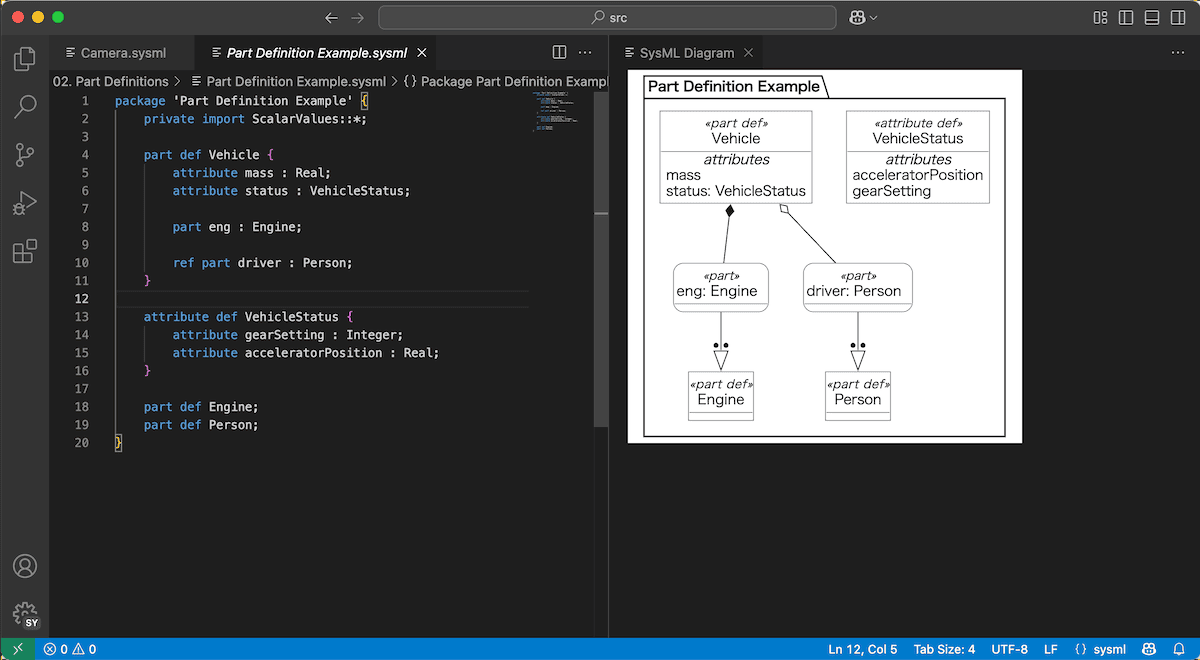
Syntax highlighting, real-time validation, and diagram generation, without leaving Visual Studio Code.
Countries
Registered Members
Model SysML v2 the Way You Write Code
SysML v2 defines a textual notation alongside its graphical one. SysMLv2 Editor supports that textual notation directly, so a model is a plain .sysml file that Git can diff and a code review can cover.
There is no separate modeling environment to launch, no proprietary file format to manage, and no export step before a model can be shared.
What Sets It Apart:
- One Environment: Model in the same editor you use for code, with the same keyboard shortcuts, the same version control, and the same extensions.
- The File Is the Model: A .sysml file is plain text. Diff it, review it, and automate it exactly as you would source code.
Key Features
Language support built for SysML v2, inside Visual Studio Code.
Syntax Highlighting
Keywords, strings, and comments are colour-coded, so the structure of a model is readable at a glance and typos stand out.
Real-Time Syntax Checking
Your model is validated against the SysML v2 grammar as you type. Errors and warnings appear inline, before you run anything.
Navigate to Definition
Place the cursor on a reference and jump straight to where it is declared. Large models stay navigable as they grow.
Outline View
A structured overview of the current file, so you can see the shape of a model without scrolling through it.
Diagram Generation
Generate a diagram from the current file to check structure and behaviour visually. Diagrams are for reading; editing happens in the text.
Plain-Text Models
A .sysml file is plain text. Track it in Git, diff it in a pull request, and review it alongside the code it describes.
Who SysMLv2 Editor Is For
- Systems engineers who already work in Visual Studio Code
- Teams that manage models in Git alongside source code
- Organisations starting new SysML v2 work, rather than migrating existing SysML v1 models
- Engineers who would rather write a model than draw one
SysMLv2 Editor does not open Astah SysML data. SysML v1 models created in Astah SysML cannot be imported. SysML v1 and SysML v2 are separate notations, and the tools that handle them are separate as well.
SysMLv2 Editor and SysMLv2 Modeler
Change Vision, Inc. develops two SysML v2 tools. Both are Visual Studio Code extensions. They differ in how you work with diagrams.
| SysMLv2 Editor | SysMLv2 Modeler | |
|---|---|---|
| Primary interaction | Text | Text and diagrams |
| Diagram editing | Read-only | Edit directly on the diagram |
| Availability | Available now | Early access |
| Licensing | Included with an Astah SysML or Astah System Safety license | To be announced |
Choose SysMLv2 Editor if you want to write SysML v2 as text today.
Choose SysMLv2 Modeler if you need to build and rearrange models on a canvas.
Licensing and Free Trial
SysMLv2 Editor is included with a valid license for any of the following products. There is no separate purchase.
Free Trial
First-time users can use every feature for 20 days at no cost.
The trial period is shared with Astah SysML. If your Astah SysML trial has already ended, the SysMLv2 Editor trial is not available. If you evaluated Astah SysML previously and would like to try SysMLv2 Editor, please contact us.
System Requirements
| Editor | Visual Studio Code |
| Operating systems | Windows, macOS, Linux |
| License | Astah SysML, Astah System Safety, or Astah Faculty Site License |
Initial Trial Setup
Install Astah SysML and launch it once before using SysMLv2 Editor. This completes the trial setup.
Get Started with SysMLv2 Editor
- Install SysMLv2 Editor from the Visual Studio Code Marketplace
- Install Astah SysML and launch it once to complete the license setup
- Create a .sysml file and start modeling