
Our Commitment to the
EU Cyber Resilience Act (CRA)
At Change Vision, Inc. (Astah), product security and customer trust are our highest priorities.
We are fully aware of the EU Cyber Resilience Act (CRA), which aims to enhance the security of digital products in the EU market.
Current Status (As of September 2026)
As of September 11, 2026, we are fully compliant with the EU Cyber Resilience Act (CRA) Article 14 reporting obligations. We are actively executing our compliance roadmap toward full product certification ahead of December 2027.
Our Compliance Roadmap
(September 2026)
Vulnerability & Incident Reporting Framework Active
(December 2027)
Essential Security Requirements & CE Certification
Ensure all active Astah products complete required conformity assessment procedures and meet essential cybersecurity requirements, technical documentation, and CE marking rules.
Single Point of Contact for Security Reporting
If you discover or suspect a vulnerability in any Astah product, please report it to us immediately using the form below.
Submitted reports are immediately processed by our security response team. If an actively exploited vulnerability or severe incident is confirmed, notifications are submitted via the EU reporting mechanism within required timeframes.
Direct & Encrypted Email Contact
If you prefer not to use the web form, or if you need to attach screenshots, logs, or proof-of-concept files, you can email our security team directly at: security@change-vision.com
How to check your Astah version
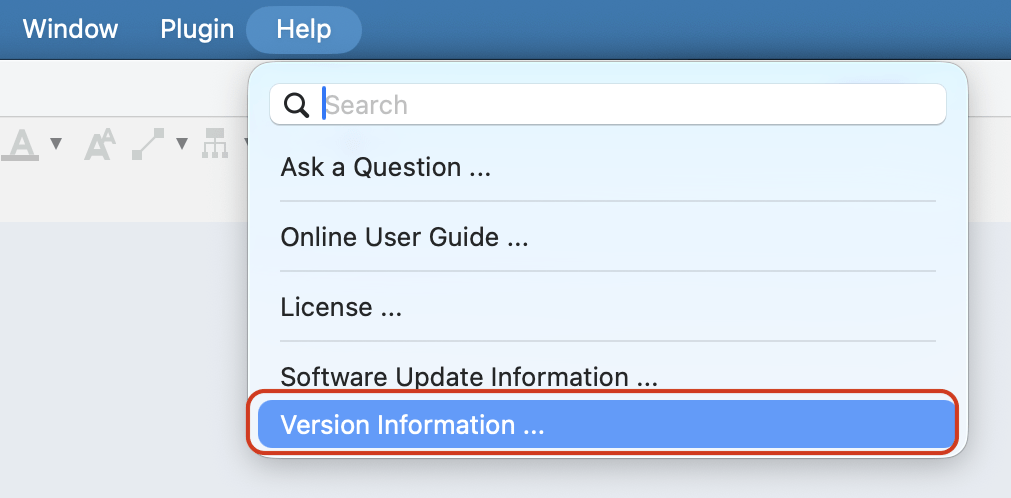
1. Go to [Help] – [Version Information]
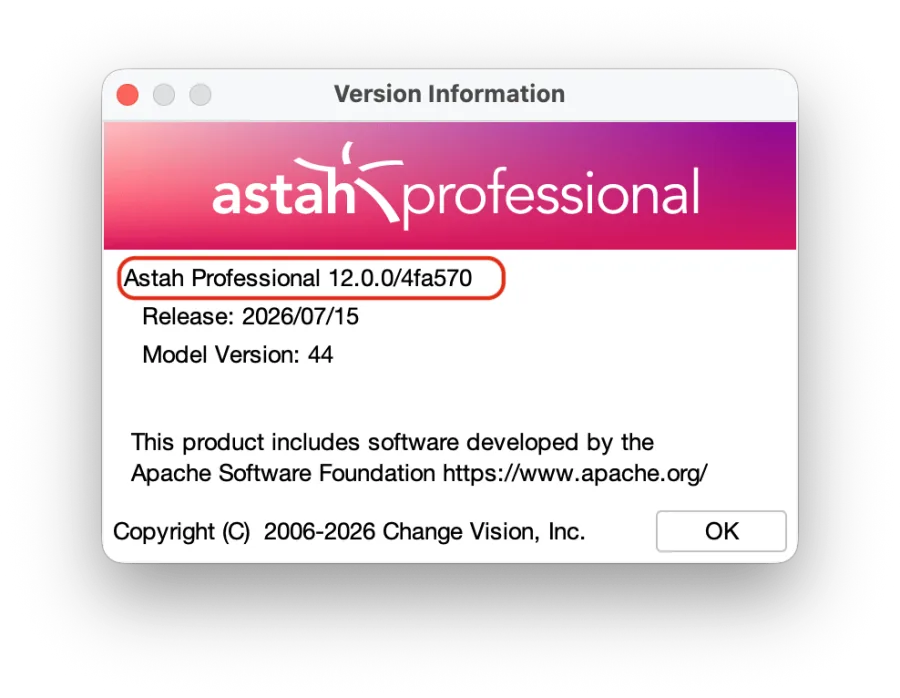
2. The [Version Information] dialog will appear. Copy and paste the line circled in red into your report.
Product Security & Update Instructions
In accordance with the EU Cyber Resilience Act requirements, below are the detailed instructions regarding security-relevant updates and settings for Astah products.
How security-relevant updates can be installed:
When a software patch or security-relevant update becomes available, we will inform our customers via our official website, direct email notifications, and/or in-product alerts. To install a security update, please follow these steps:
Download
Visit our official website and download the package containing the latest security fixes.
Get Latest InstallerExecute
Close any running instances of Astah, then double-click the downloaded installer file to launch it.
Apply
Follow the on-screen prompts in the setup wizard. The installer will automatically overwrite and update your existing application files.
Verify
Once finished, launch Astah and check [Help] > [Software Update Information] to verify your secure version.
*Note: Your existing project files, user preferences, and license configurations will remain safely intact during this update process.*
Automatic installation settings and notification opt-out
To prevent unexpected disruptions to your environment, Astah does not perform silent automatic installations of security updates in the background. All updates must be explicitly initiated by the user.
However, to ensure you are promptly notified of critical security patches, Astah is configured by default to automatically check for available software updates upon application launch.
If you wish to turn off this default automatic checking and notification mechanism, you can disable it by following these steps:
- Navigate to [Tools] > [System Properties] from the top menu.
- Select [Other] from the left-hand menu.
- Uncheck the box next to [Check for Software Updates when launching Astah].
- Click [Apply], then click [OK].
Frequently Asked Questions
Are Astah products compliant with the EU Cyber Resilience Act (CRA)?
Yes. We currently meet all active CRA requirements, including coordinated vulnerability disclosure and incident reporting protocols. We are on schedule to complete full conformity assessments and essential security certifications prior to the December 2027 deadline.