
AI Modeling Example
From Requirements to Code with AI in Astah
Follow one project, an order management system for an online shop, from the first requirements to a class diagram, a design review, Java code and a database design document. Copy each prompt and try it in your own project.
Seven steps, one project
Each step shows a prompt you can copy, an example of the AI’s reply, and what changes in your model. The steps build on each other, but you can try any of them on its own.
What you need
Steps 1–4 and 7. Built into Astah. Needs your own API key from a supported AI service, such as OpenAI, Claude or Gemini. Setup guide
Steps 5–6. Connect an AI client such as Claude Code or GitHub Copilot to Astah. No API key needed in Astah, because your AI client uses its own account. Setup guide
Steps 1–6 work in both. Step 7 uses an ER diagram, so it needs Astah Professional. Compare editions
The AI replies below are shortened examples. Your replies will differ depending on the AI service and model you use, so review what the AI creates, and back up your project before the AI edits your model. See Using AI in Astah.
Explore the requirements
Start by asking the AI which functions the system needs. Ask it not to edit the model yet, so you can decide the direction before any diagram is created.
Prompt
I want to build an order management system for an online shop.
Which functions does it need? Do not edit the model yet. Only suggest.
Example response (Gemini 3.1 Pro Preview, shortened)
An order management system for an online shop should be divided into distinct functional modules. The core functions are:
- Order Processing & Lifecycle Management: order creation, validation, status tracking (Pending → Confirmed → Shipped → Delivered), and cancellation
- Inventory & Stock Management: stock reservation, stock deduction and backorders
- Payment Processing: authorization through a payment gateway, capture and refunds
- Shipping & Fulfillment: warehouse routing, shipping costs and tracking
- Customer Communication: order notifications and order history
- Returns Management: return requests, inspection, and replacements or refunds
To start modeling, we could begin with a use case diagram to identify the actors, or a class diagram to define the core entities, such as Order, OrderItem, Product, Customer and Payment.
Create a class diagram
Pick one of the suggested functions and ask for a class diagram. Focusing on one area at a time gives clearer diagrams.
Prompt
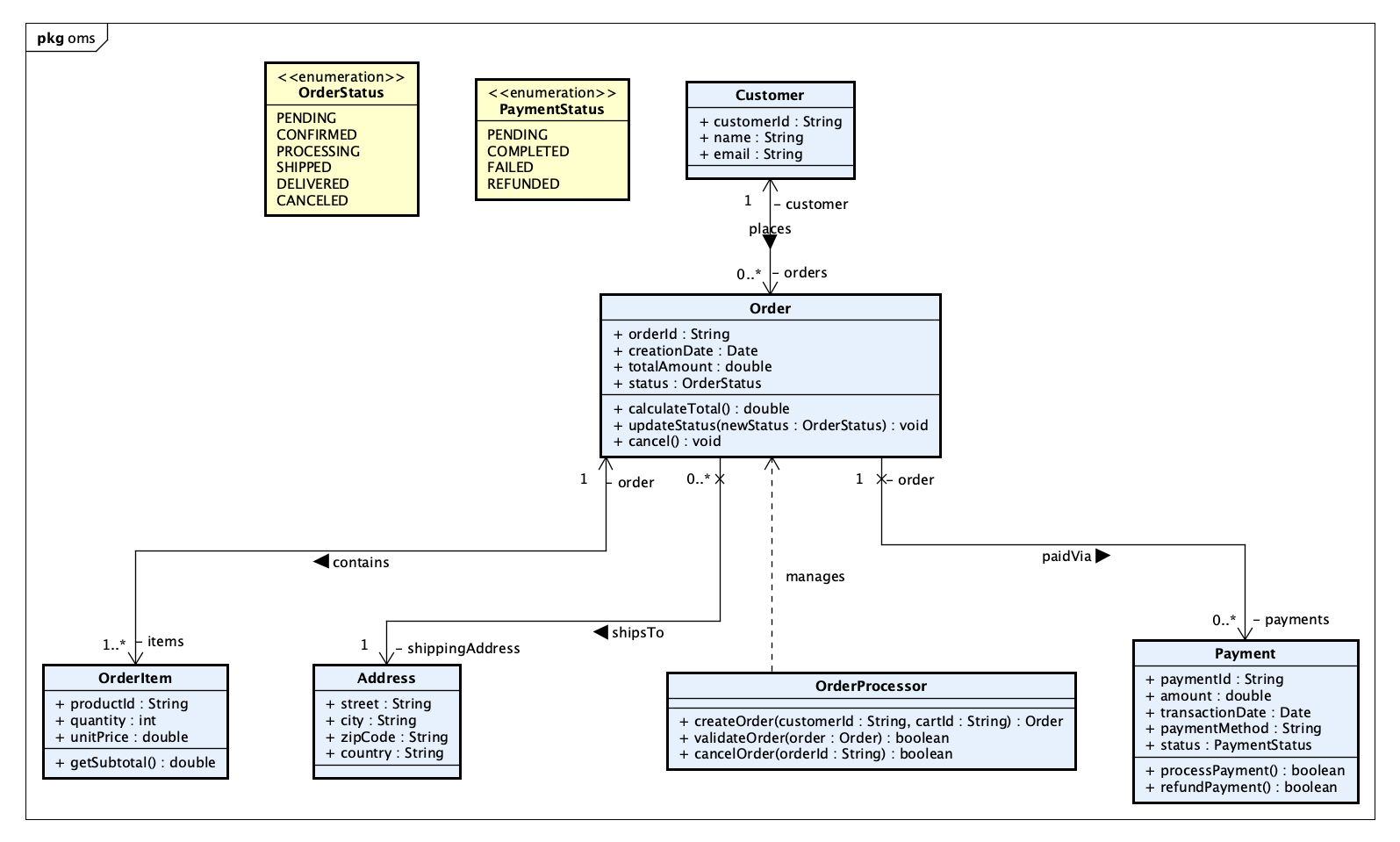
Create a class diagram for function 1, order processing and lifecycle management.Result: AI Chat Copilot creates the classes Order, OrderItem, Customer, Address and OrderProcessor, with an OrderStatus enumeration for the order lifecycle.
Then refine it in the same conversation:
Prompt
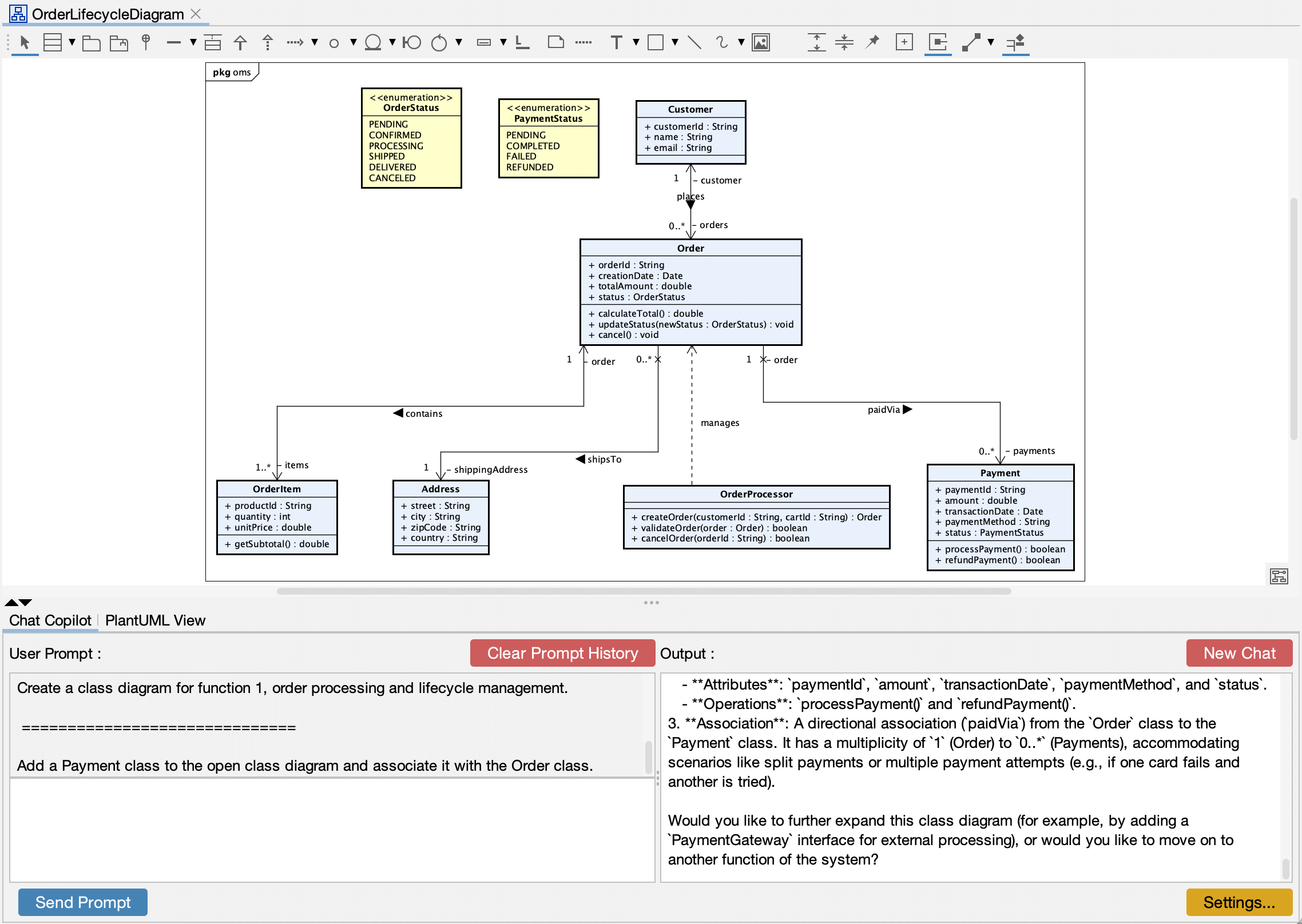
Add a Payment class to the open class diagram and associate it with the Order class.Example response (Gemini 3.1 Pro Preview, shortened)
- Payment class: attributes
paymentId,amount,transactionDate,paymentMethodandstatus, and operationsprocessPayment()andrefundPayment() - Association: a directional association (
paidVia) fromOrdertoPayment, with a multiplicity of 1 to 0..*, to allow split payments or multiple payment attempts
Would you like to expand this class diagram further, for example with a PaymentGateway interface, or move on to another function?
Review the design
Ask the AI to find problems in the diagram. Naming a principle or a standard, such as SOLID, gives you more focused findings.
Prompt
Point out design problems in the open class diagram, grouped by category.
Check it against the SOLID principles. Do not change the model yet.
Example response (Gemini 3.1 Pro Preview, shortened)
Here are the design problems in OrderLifecycleDiagram, grouped by category:
- Single Responsibility Principle:
Paymentholds both payment data and the logic to process it. Calls to external payment gateways should move to a dedicated service, such asPaymentGatewayService. - Dependency Inversion Principle:
OrderProcessoris a concrete class. Extracting an interface would let you swap implementations, for example for testing. - Open/Closed Principle:
paymentMethodis a plainString, so adding a payment method means changing conditional logic. An enumeration or a strategy pattern would avoid that. - Navigability: the
containsassociation is navigable in both directions, soOrderItemkeeps an unnecessary reference back to itsOrder. - Encapsulation: all attributes are public. State should be private and changed only through methods.
Then apply the fixes you agree with, one at a time:
Prompt
Make the contains association a composition owned by Order,
navigable only from Order to OrderItem.
Result: the contains association becomes a composition (a filled diamond at the Order end), and OrderItem no longer keeps a reference back to its Order.
Create and explain a sequence diagram
AI Chat Copilot can turn the class diagram into a sequence diagram, then explain the flow to people who do not read UML.
Prompt
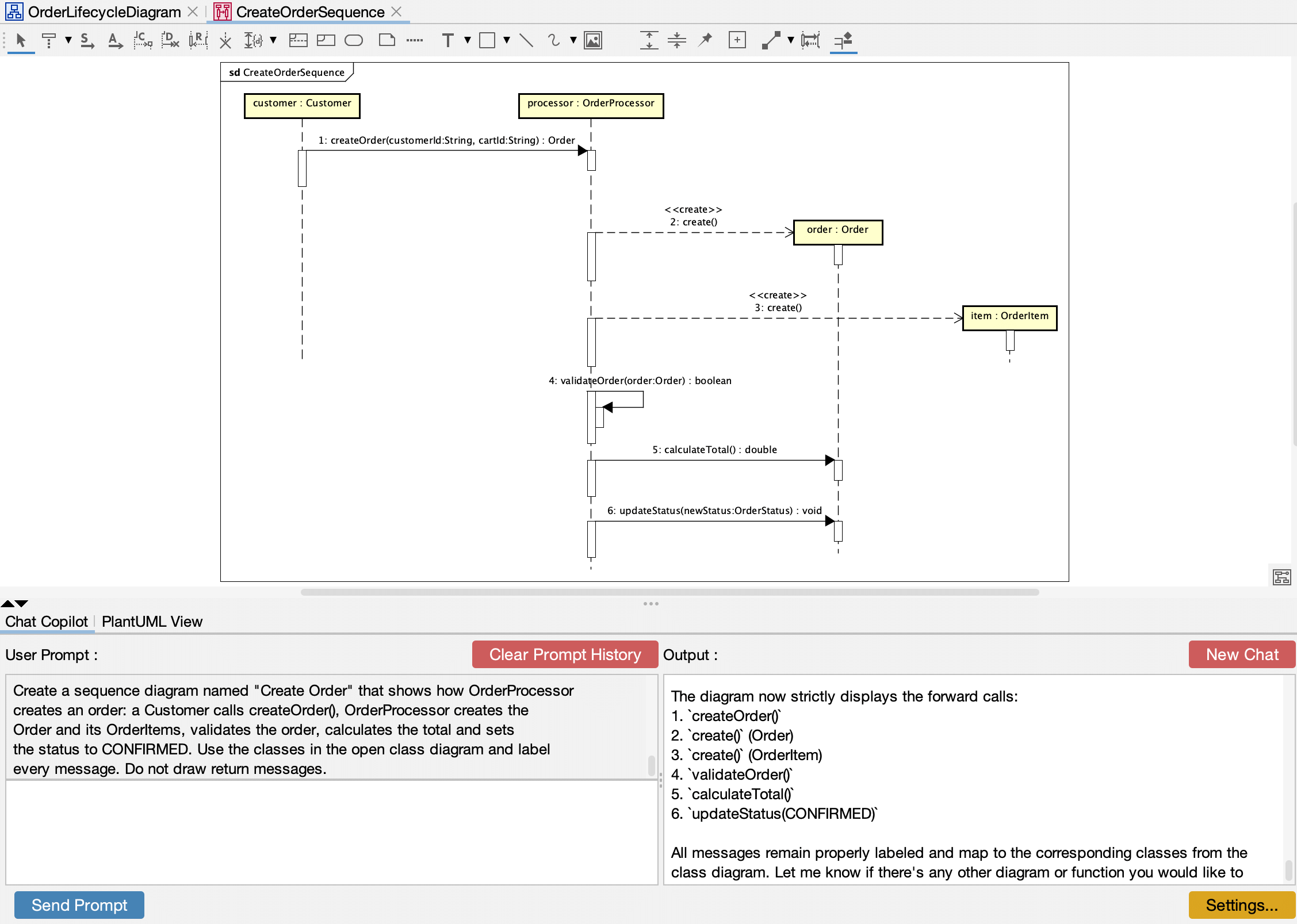
Create a sequence diagram that shows how OrderProcessor creates an order:
a Customer calls createOrder(), OrderProcessor creates the Order and its
OrderItems, validates the order, calculates the total and sets the status
to CONFIRMED. Use the classes in the open class diagram and label every
message. Do not draw return messages.
Result: AI Chat Copilot creates a sequence diagram with six labeled messages, using the classes and operations from the class diagram: createOrder(), the creation of the Order and its OrderItem, validateOrder(), calculateTotal() and updateStatus().
Then ask for an explanation:
Prompt
Explain the processing flow of the open sequence diagram in plain language,
for team members who do not read UML.
Example response (Gemini 3.1 Pro Preview, shortened)
This process describes what happens behind the scenes from the moment a customer clicks “Place Order” until the order is officially confirmed:
- The customer places the order. The request goes to the Order Processor, the brain of the ordering system.
- The system sets up the order. The Order Processor creates a blank, official Order record.
- The system adds the items. It creates a record for each Order Item and attaches it to the new order.
- The system runs safety checks. It validates the order, for example that the required data is present and the items are valid.
- The final price is calculated. The order adds up the prices of all its items.
- The order is confirmed. The status changes to “Confirmed”, and the order is ready for the next steps, such as payment and shipping.
In short: the system receives the request, builds the order from the customer’s items, checks it, calculates the final price and marks it as confirmed.
Generate code from the class diagram
For code, work from an AI client such as Claude Code or GitHub Copilot, connected to Astah through the MCP server. The AI client reads the class diagram in Astah and writes the code in your project.
Prompt (in your AI client)
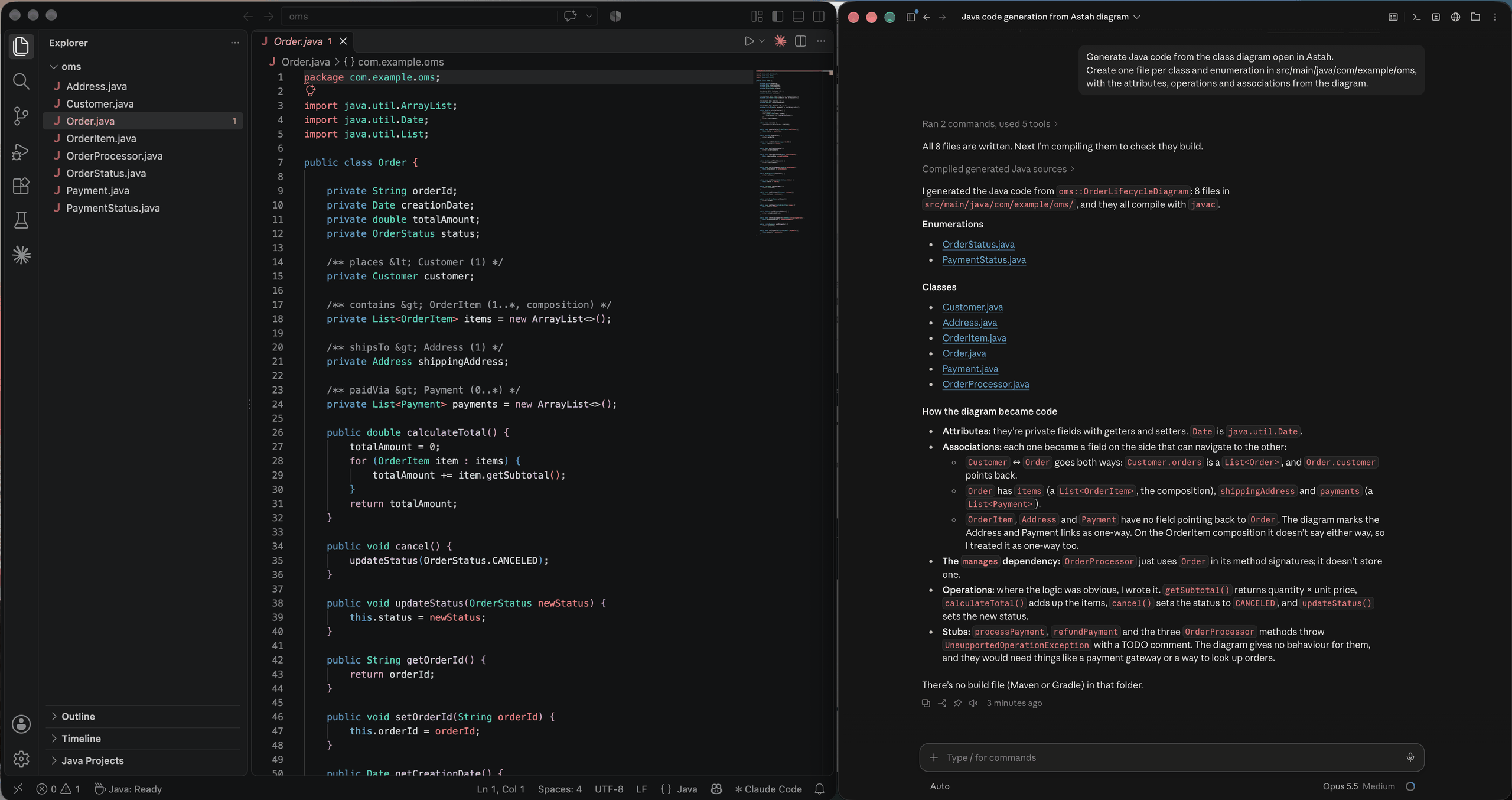
Generate Java code from the class diagram open in Astah.
Create one file per class and enumeration in src/main/java/com/example/oms,
with the attributes, operations and associations from the diagram.
Example response (Claude Code, Opus 5.5, shortened)
I generated the Java code from OrderLifecycleDiagram: 8 files in src/main/java/com/example/oms/, and they all compile with javac.
- Attributes are private fields with getters and setters.
- Associations became fields on the side that can navigate to the other:
CustomerandOrderpoint to each other, andOrderhasitems(aList<OrderItem>, the composition),shippingAddressandpayments. - The
managesdependency:OrderProcessorusesOrderin its method signatures but doesn’t store it. - Operations: where the logic was obvious, I wrote it.
getSubtotal()returns quantity × unit price,calculateTotal()adds up the items, andcancel()andupdateStatus()set the status. The rest are TODO stubs.
When the design changes, update the code from the model. In this example, we added a trackingNumber attribute to Order and removed country from Address in Astah, then asked:
Prompt (in your AI client)
I changed the class diagram open in Astah. Compare it with the code
and update the code to match.
Example response (Claude Code, Opus 5.5)
I compared the updated diagram with the code and found two changes. Both are now in the code, and all 8 files still compile with javac.
- Address.java: I removed the
countryfield and its getter and setter, because it’s gone from the diagram. - Order.java: I added a
private String trackingNumberfield with a getter and setter, matching the new attribute in the diagram.
Everything else in the diagram still matches the code: the other classes, both enumerations, the operations, and the associations with their multiplicities and directions.
Check that the model and the code match
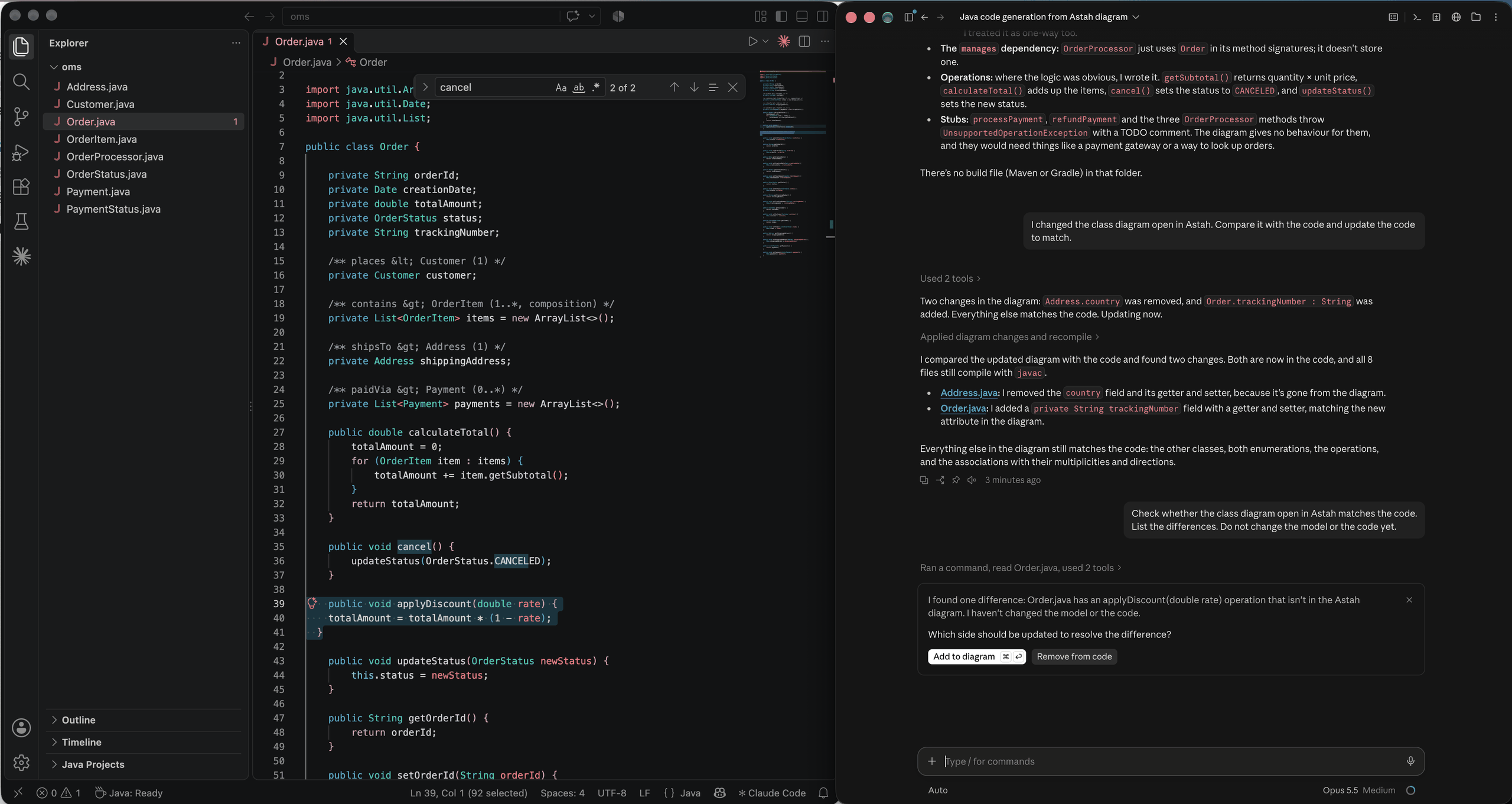
Code changes too. Here we added an applyDiscount() method to Order.java by hand, then asked the AI client to compare the code with the model.
Prompt (in your AI client)
Check whether the class diagram open in Astah matches the code.
List the differences. Do not change the model or the code yet.
Example response (Claude Code, Opus 5.5)
I found one difference: Order.java has an applyDiscount(double rate) operation that isn’t in the Astah diagram. I haven’t changed the model or the code.
Which side should be updated to resolve the difference? Add to diagram or Remove from code
We chose Add to diagram:
Example response (Claude Code, Opus 5.5)
I added the public operation applyDiscount(rate: double) : void to Order in the Astah diagram, and the diagram’s classes and members now match the code.
Result: the model is up to date with the code again. Changes can flow both ways: from the model to the code (step 5) and from the code back to the model.
Create a database design document from the ER diagram
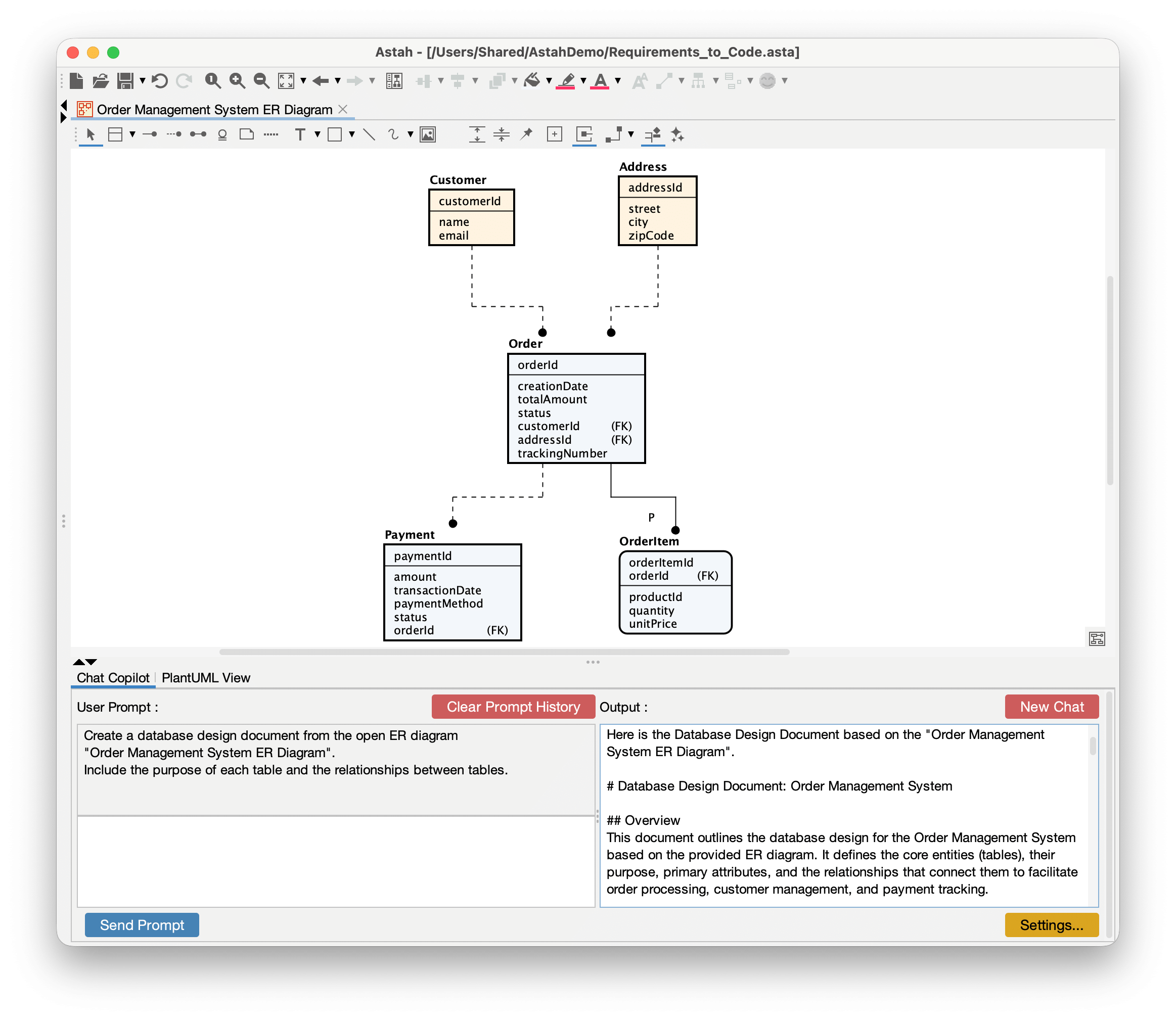
In Astah Professional, AI Chat Copilot can turn an ER diagram into a first draft of a database design document. Here we used an ER diagram of the same order management system.
Prompt
Create a database design document from the open ER diagram
"Order Management System ER Diagram". Include the purpose of each table
and the relationships between tables.
Example response (Gemini 3.1 Pro Preview, shortened)
Overview: This document defines the core tables, their purpose, their attributes and the relationships that connect them, for order processing, customer management and payment tracking.
Relationships:
- Customer → Order (1 to many): a customer can place many orders, and each order belongs to exactly one customer.
- Address → Order (1 to many): an address can be used for many orders, for example a customer reusing their home address.
- Order → OrderItem (1 to many, identifying): an order item can’t exist without its order.
orderIdis both a foreign key and part of the item’s primary key. - Order → Payment (1 to many): an order can have several payments, for split payments or retried failed payments.
Result: a draft with the purpose, columns and data types of each table and the relationships between them, which you can review and complete.
Try it with your own project
All you need is Astah and an API key for AI Chat Copilot, or an AI coding agent you already use for the MCP server.
Students: get Astah UML free · Setup: AI Chat Copilot · MCP server