
Astah MCP Server




The MCP server lets AI clients such as Claude Code, GitHub Copilot, Codex and Claude Desktop read and edit your Astah models through MCP (Model Context Protocol). It comes with Astah as part of AI Chat Copilot, so there is nothing extra to install. For use cases with prompts and videos, see AI Modeling in Astah.
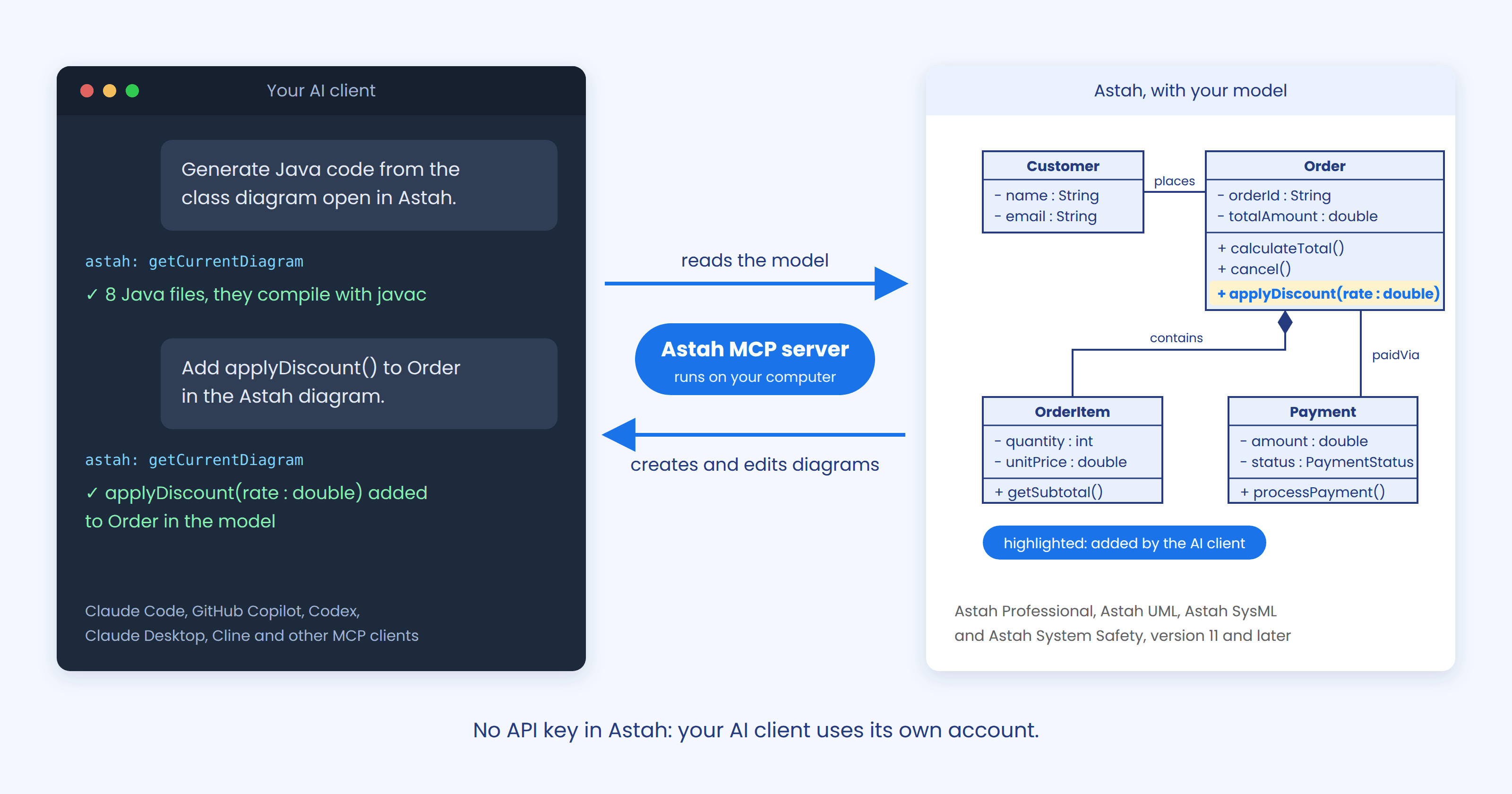
What is MCP?
MCP (Model Context Protocol) is a standard way to connect AI clients to tools and applications. For details, see the official MCP documentation.
Overview
Supported products
The MCP server works with these products, version 11 and later:
It is developed by Change Vision and is separate from the community Astah Pro MCP plugin.
Supported diagrams
Through the MCP server, AI clients can create and edit these diagrams in the latest version of each product.
| Diagram | Products |
|---|---|
| Class diagram | Astah Professional, Astah UML |
| Use case diagram | Astah Professional, Astah UML |
| Sequence diagram | Astah Professional, Astah UML |
| Activity diagram | Astah Professional, Astah UML |
| State machine diagram | Astah Professional, Astah UML |
| ER diagram | Astah Professional |
| Requirement diagram | Astah SysML, Astah System Safety |
| Block definition diagram | Astah SysML, Astah System Safety |
| Internal block diagram | Astah SysML, Astah System Safety |
| Parametric diagram | Astah SysML, Astah System Safety |
In Astah Professional and Astah UML, AI clients can also import and export PlantUML. See Start from PlantUML.
Verified AI clients
Other AI clients that support MCP also work. See Connect your AI client.
API key required
Astah has no built-in AI. The MCP server uses the AI service and API key set in AI Chat Copilot’s AI Settings, so set them before you start.
Privacy and limitations
- Your AI client reads your Astah model and sends it to the AI service it uses. Change Vision does not receive it.
- The MCP server works only while Astah is open. Astah does not offer real-time co-editing between team members.
- For data and privacy, costs and limitations, see Using AI in Astah.
Set up Astah
- Open the Chat Copilot pane
In Astah, choose [View] > [Show/Hide Extra View], then select the Chat Copilot tab.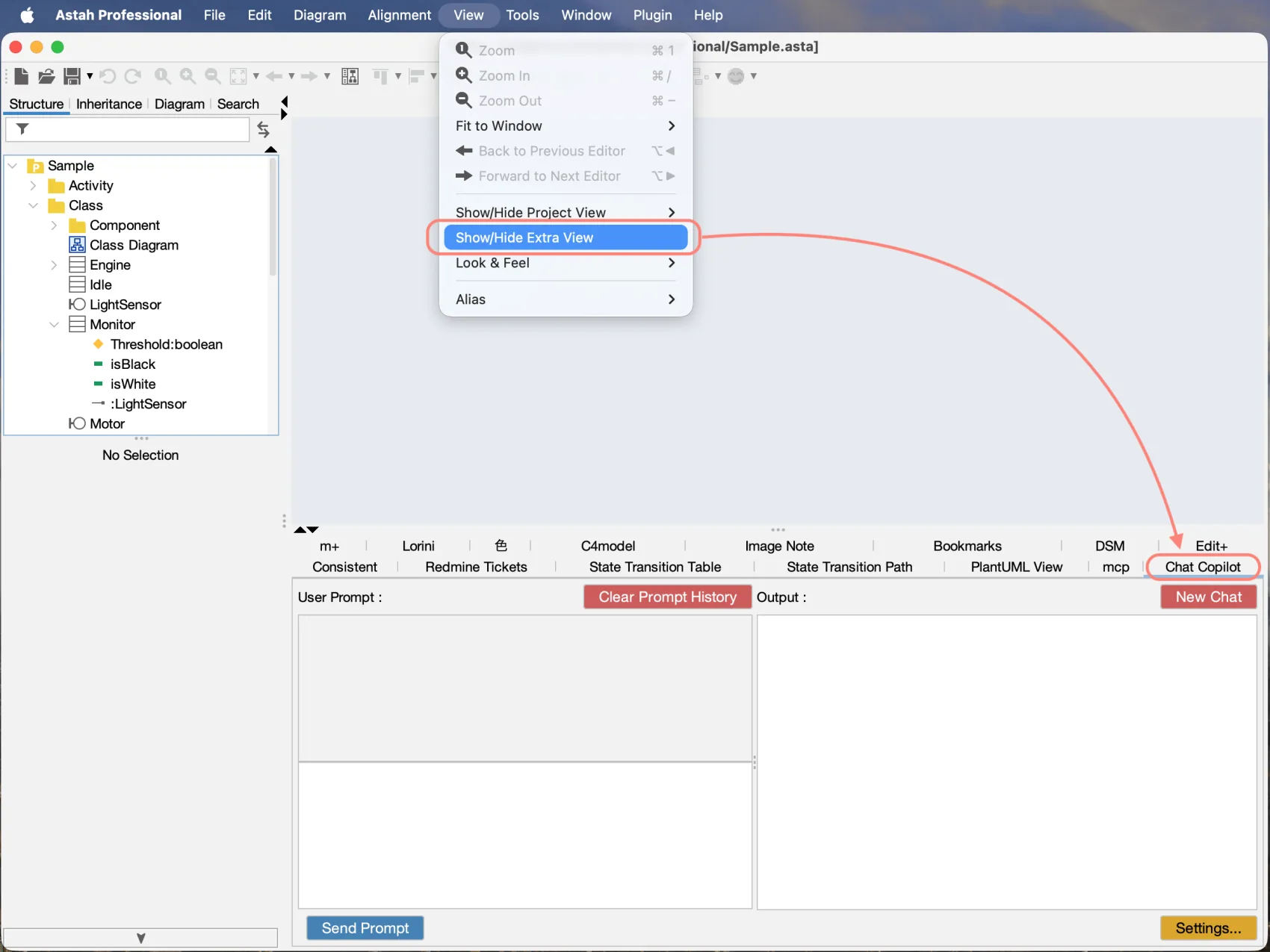
- Turn on MCP Integration
Click Settings to open [Settings] window.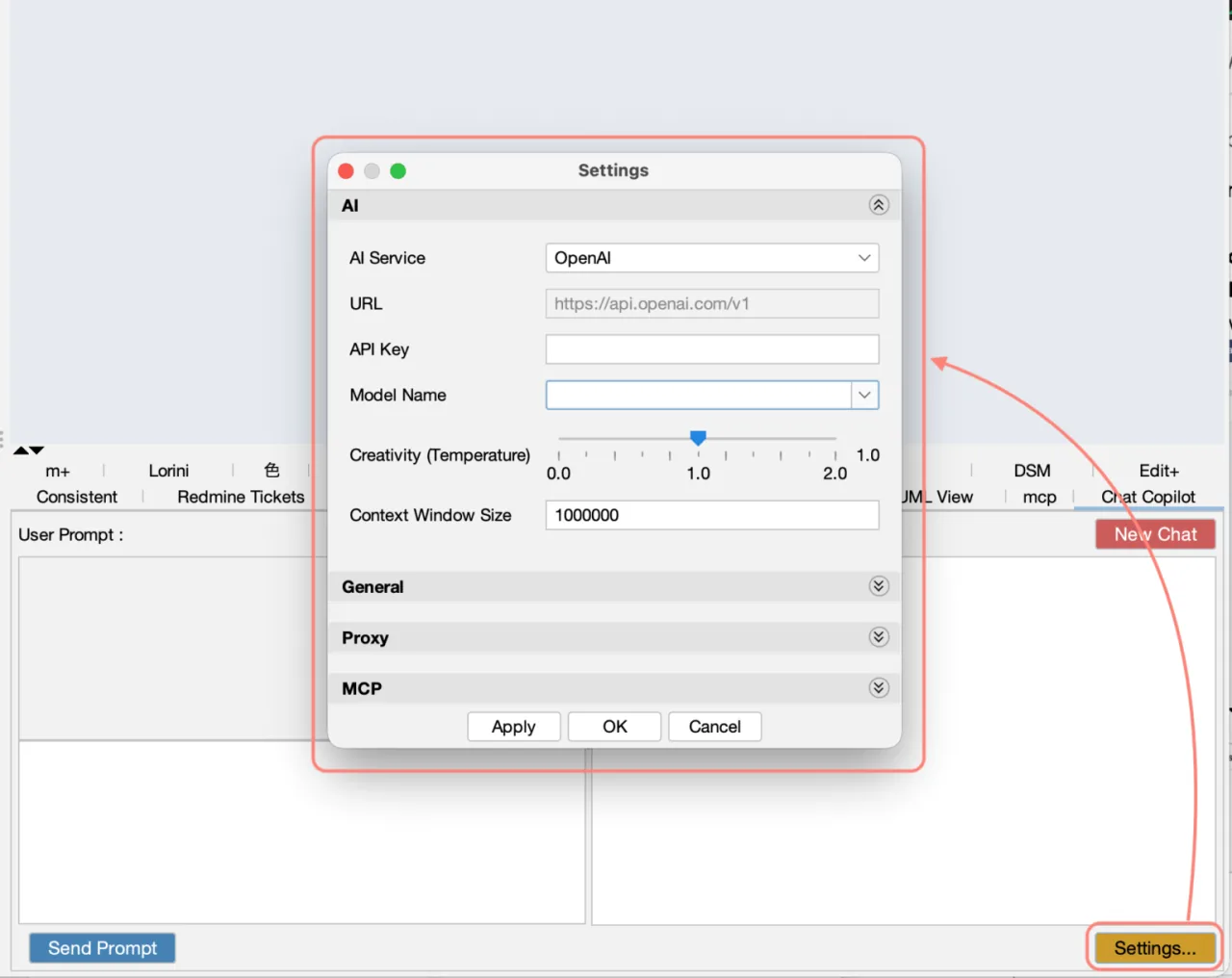
- Turn on the MCP server
Open the MCP section and turn on MCP Integration. Change MCP Port only if port 3099 is already in use, and use the same port in your AI client.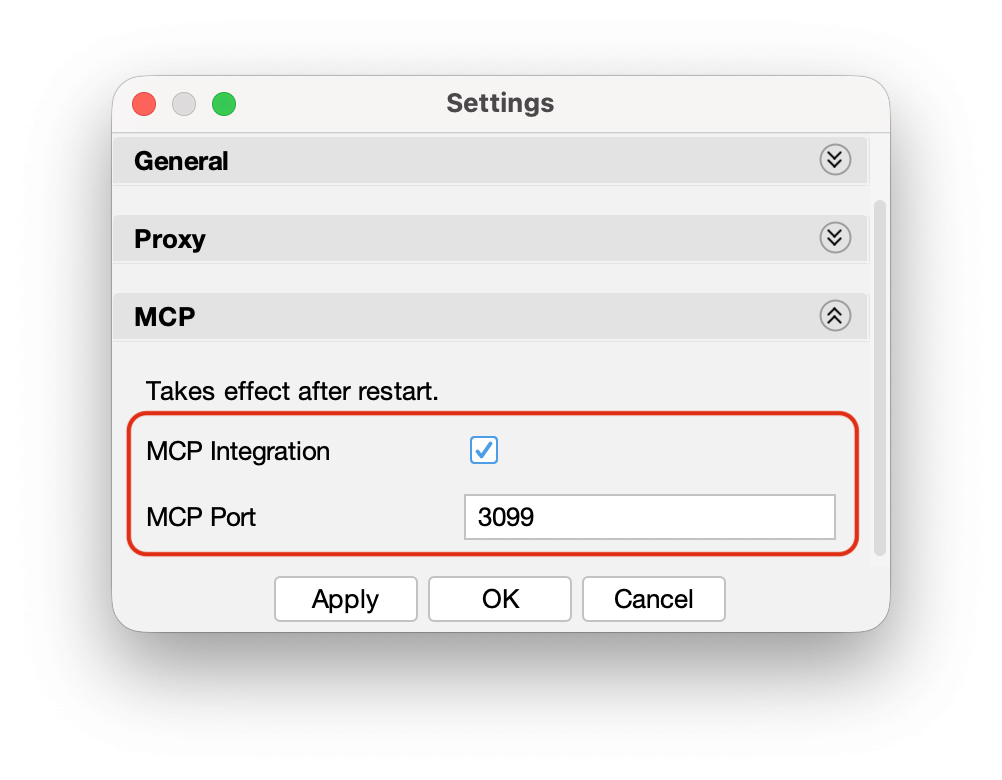
- Restart Astah
MCP settings take effect after you restart Astah.
Connect your AI client
Register the MCP server in your AI client once.
Connection information
- Transport: Streamable HTTP
- URL:
http://localhost:3099/mcp - Default port: 3099. If you change the port in Astah, change it in the URL too.
Select your AI client:
Claude Code
In a terminal on the computer where Claude Code is installed, run:
claude mcp add --transport http --scope user astah-mcp http://localhost:3099/mcp--scope sets where the setting applies:
- local (default): only the current folder
- project: saved in
.mcp.jsonin your project, so you can share it with your team - user: every folder on this computer
GitHub Copilot Chat
- Open VS Code with the GitHub Copilot Chat extension installed.
- Open the Command Palette (Ctrl+Shift+P on Windows and Linux, Cmd+Shift+P on macOS) and run MCP: Add Server.
- Select HTTP, enter
http://localhost:3099/mcpas the URL andastah-mcpas the server ID. - Choose where to save the setting: Workspace (this workspace only) or Global (all workspaces).
Cline
- In VS Code, open the Cline tab in the Activity Bar.
- Click the settings icon, then Configure MCP Servers.
- Add the following to the configuration file and save it:
{
  "mcpServers": {
    "astah-mcp": {
      "url": "http://localhost:3099/mcp",
      "type": "streamableHttp",
      "disabled": false
    }
  }
}
Copilot CLI
- Start Copilot CLI and run
/mcp add. - Enter
astah-mcpas the server name, select HTTP as the server type, and enterhttp://localhost:3099/mcpas the URL. - Leave HTTP headers empty. Set Tools only if you need to limit them.
Codex
In Command Prompt (Windows) or Terminal (macOS and Linux), run:
codex mcp add astah-mcp npx mcp-remote http://localhost:3099/mcpThis uses npx, so Node.js 18 or later must be installed.
Claude Desktop
- In Claude Desktop, open the menu and choose Settings > Developer > Edit Config.
- Add the following to
claude_desktop_config.jsonand save it:
{
  "mcpServers": {
    "astah-mcp": {
      "command": "npx",
      "args": ["-y", "mcp-remote", "http://localhost:3099/mcp", "--allow-http"]
    }
  }
}- Quit Claude Desktop from the menu with Quit, then start it again. Closing the window with × may leave it running in the background.
This needs Node.js 18 or later.
Start using it
Start Astah first
Start Astah before your AI client. If the AI client starts first, it may not connect to the MCP server.
Then ask your AI client to work with your Astah model. Select a use case to see prompts you can copy:
Turn PlantUML into editable UML diagrams
- Ask your AI service for a diagram in PlantUML, or use PlantUML you already have:
Write a PlantUML class diagram for a library system with Member, Book, Author and Loan. A member can borrow up to 5 books at a time. - In your AI client, import it and refine it in natural language:
Import this PlantUML into Astah as a class diagram named "Library - Domain Model". Then add a Reservation class linked to Member and Book. - Edit the model by hand in Astah. When you need text again, for example for a document or a pull request, export it with your changes:
Export the class diagram "Library - Domain Model" from Astah as PlantUML,
including the changes I made by hand.
Supported for class, use case, sequence, activity and state machine diagrams. To import or export PlantUML without AI, use the PlantUML Plugin.
Available in Astah Professional and Astah UML.
Create diagrams from files in your project
- Open your project folder in your AI client, and open the Astah project you want to update.
- Ask the AI client to read a file and create a diagram in Astah:
Read docs/requirements.md and create a UML class diagram named "Library - Domain Model" in Astah with the main classes, attributes, relationships and multiplicities. - Ask for changes in the same conversation, for example:
Compare the class diagram "Library - Domain Model" with the classes
in src/library and list the differences. Do not change the model yet.
Available in Astah Professional and Astah UML. In Astah SysML and Astah System Safety, ask for SysML diagrams instead.
Review a design from your AI client
- Open the diagram in Astah.
- In your AI client, ask for a review without changing the model:
Review the class diagram "Library - Domain Model" in Astah. List missing elements, unclear relationships and naming inconsistencies, most important first. Do not change the model yet. - Apply the suggestions you agree with, by number:
Apply suggestions 2, 3 and 4.
Available in all four products.
→ More AI examples, with prompts and screenshots
Troubleshooting
Select an issue to see how to fix it.
The AI client cannot connect to Astah
#
- Check that Astah is running.
- Check that MCP Integration is on in the MCP settings.
- Restart Astah, then restart the AI client.
The port is already in use
#
Cause: Another application is using the same port.
- Change MCP Port in the MCP settings, for example to 3010.
- Restart Astah.
- Change the port in your AI client’s URL too, for example
http://localhost:3010/mcp.
The AI client does not find Astah
#
Cause: Astah was started after the AI client, or the settings have not been applied.
- Quit the AI client completely, including background processes.
- Start Astah and check that MCP Integration is on.
- Start the AI client and send a new prompt.
Node.js version error (Claude Desktop, Codex)
#
Cause: Node.js older than version 18 is installed.
- Install the LTS version from nodejs.org.
- Run
node --versionin Command Prompt or Terminal to check the version. - Restart Astah, then restart the AI client.
Updates
The MCP server is part of the AI Chat Copilot plugin, so updating AI Chat Copilot also updates the MCP server. To check your version and update, see Update AI Chat Copilot.