
Astah Pro MCP (Community Plugin)
Connects Astah Professional to AI agents through a local MCP server, letting AI retrieve and edit your UML models in real time.
Details

Community plugin. Astah Pro MCP is developed and maintained by an Astah user, Takaaki Teshima, not by Change Vision. It is separate from the official MCP server that is built into Astah Professional, Astah UML, Astah SysML and Astah System Safety version 11 and later. Learn how the official MCP server works.
Official MCP Server and Astah Pro MCP
| Official MCP server | Astah Pro MCP (this plugin) | |
|---|---|---|
| Developer | Change Vision, Inc. | Takaaki Teshima (an Astah user) |
| How to get it | Built into Astah version 11 and later | Download from GitHub and install as a plugin |
| Products | Astah Professional, Astah UML, Astah SysML, Astah System Safety | Astah Professional |
| Status | Part of the product | Experimental |
| Support | Change Vision | The developer, through GitHub |
Plugin Overview:
Connects Astah Professional to AI agents through a local MCP (Model Context Protocol) server, letting AI retrieve and edit your UML models in real time.
Example Use Cases
- Design a system with AI and have it generate the UML models and diagrams in Astah.
- Ask AI to explain or analyze the models and diagrams in your project.
- Generate source code from UML models – and vice versa.
- Turn hand-drawn sketches into UML diagrams, or AI responses into mind maps.
For demo videos and technical usage instructions, see the full README on GitHub.
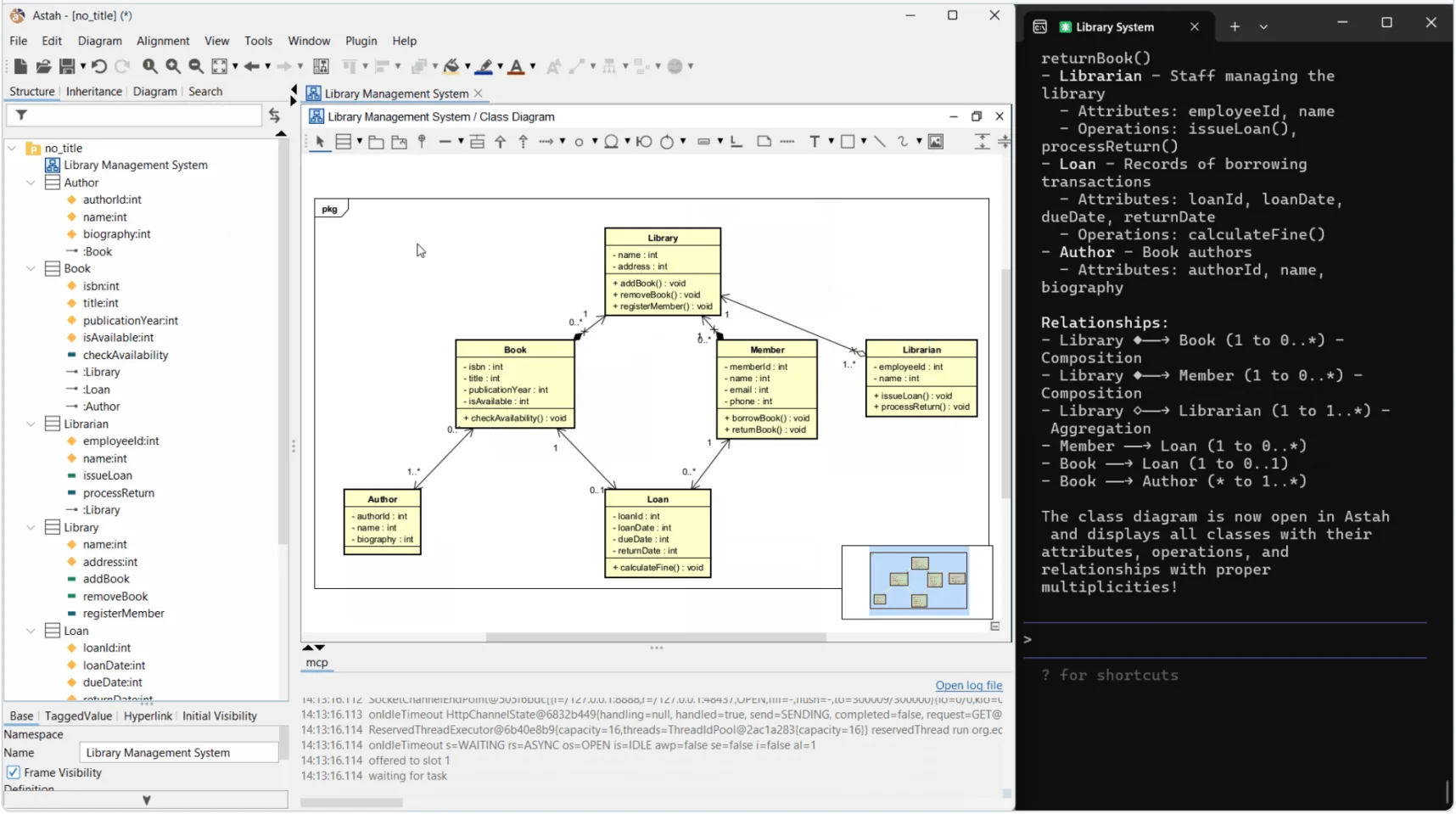
Tool Calling ModesNew
Since version 0.3.0, the plugin experimentally implements a programmatic tool calling mode, inspired by the idea described in this Anthropic article. It exposes a far smaller set of tools than the direct tool calling mode, which also remains available. Unless you have a specific reason to choose otherwise, use port 8888.
| Mode | Port | Exposed tools |
|---|---|---|
| Programmatic tool calling | 8888 |
83 |
| Direct tool calling | 18888 |
398 |
Supported AI Assistants / Agents
The following agents have been tested by the developer. From the developer’s experience, Claude Code works particularly well for UML modeling, followed by Codex CLI.
- Claude Code
- Codex CLI
- Grok Build
- Antigravity CLI
- Cursor IDE
- Antigravity IDE
- Kiro IDE
For the detailed setup instructions for each AI agent, please follow these instructions on the developer’s documentation – AI agent settings.
Supported Diagram Types
| Diagram Type | Query | Edit |
|---|---|---|
| Class diagram | ✓ | ✓ |
| Sequence Diagram | ✓ | ✓ |
| Activity Diagram | ✓ | ✓ |
| Statemachine Diagram | ✓ | ✓ |
| UseCase Diagram | ✓ | ✓ |
| Communication Diagram | ✓ | – |
| Composite Structure Diagram | ✓ | ✓ (with some limitations) |
| ER Diagram | ✓ | – |
| Requirement Diagram | ✓ | ✓ |
| Mind Map | ✓ | ✓ |
For updates and setup instructions, refer to the developer’s README on GitHub.

Installation Instructions:
- Download the latest .jar from the release page.
- In Astah, navigate to [Plugin] -> [Installed Plugins].
- In the dialogue box, click [Install], then select the downloaded .jar file.
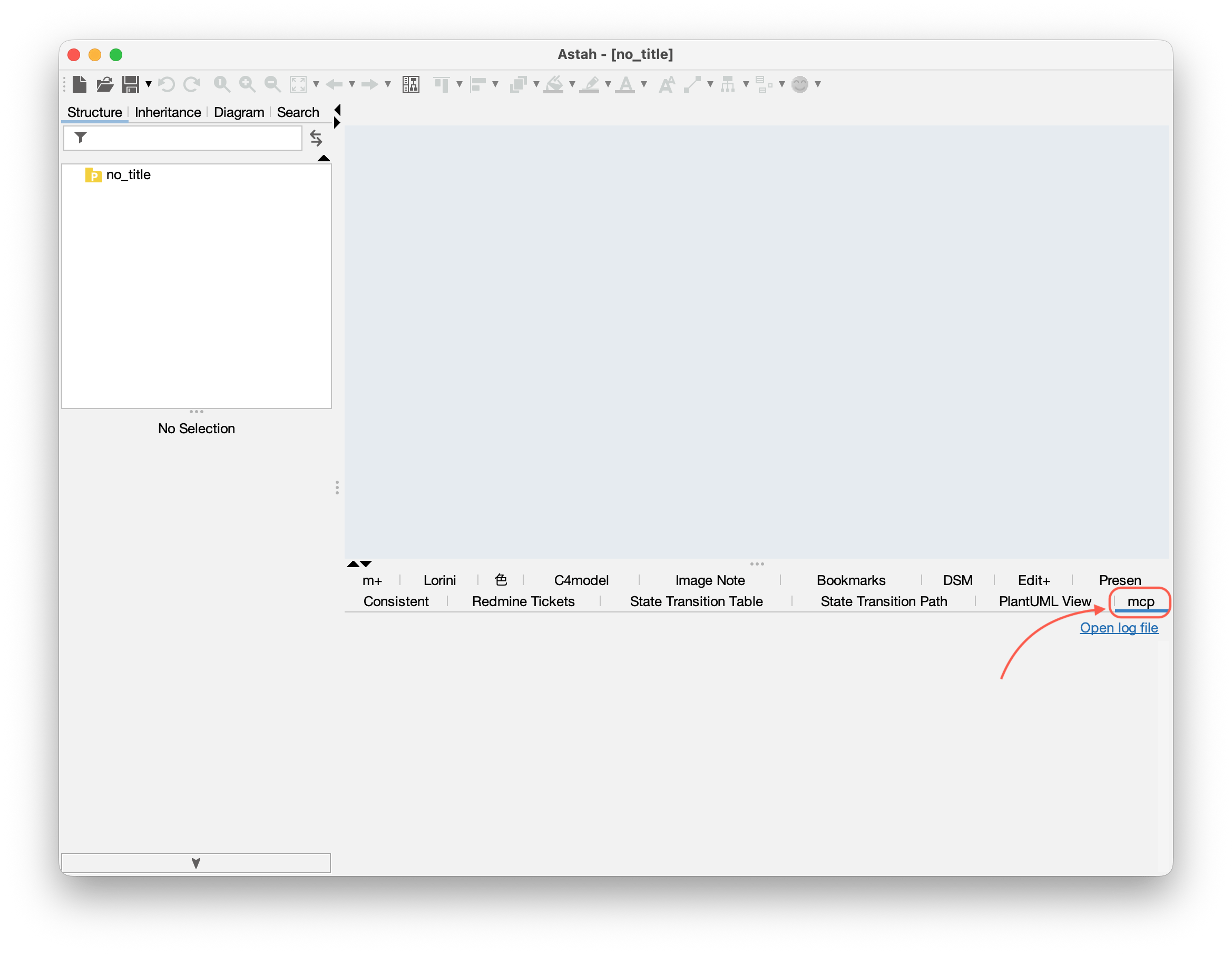
- Restart Astah. If the installation is successful, you will see a new [mcp] tab below the Diagram Editor.
- The MCP server uses Streamable HTTP transport. When configuring your AI assistant/agent, use the following:
- Use
127.0.0.1— do not uselocalhost(connections to localhost will fail). - Programmatic tool calling mode: port
8888→http://127.0.0.1:8888/mcp - Direct tool calling mode: port
18888→http://127.0.0.1:18888/mcp
- Use
- Each port can be changed with an environment variable if it conflicts with something else on your machine. Remember to update your AI agent settings to the same port number.
- Programmatic tool calling:
ASTAH_PRO_MCP_PORT_FOR_PROGRAMMATIC - Direct tool calling:
ASTAH_PRO_MCP_PORT_FOR_DIRECT
- Programmatic tool calling:
For full configuration instructions for each AI assistant/agent, refer to the plugin developer’s documentation below:
How to use
- Launch Astah Professional.
(Note: Start Astah before your AI assistant, as some AI assistants/agents attempt to connect to the MCP server immediately upon startup.) - Start the AI assistant/agent.
- Each time an AI assistant/agent establishes a new session with the MCP server, a connection dialog will appear in Astah. Review the details and click “Connect”.

- You can now send prompts to the AI assistant/agent and begin AI-powered modeling directly.
To disable the plugin, click [Plugin] > [Installed Plugins], select the Astah Pro MCP entry in the plugin list dialog, click [Disable], and restart Astah.
Example Prompts
The developer’s README shows the results of the following prompts, run in sequence against a single Astah project:
- Design a simple library management system and draw a class diagram in Astah to illustrate its structure.
- Based on the contents of the Astah model, draw a sequence diagram to illustrate the behavior of borrowing a book.
- Based on the contents of the Astah model, draw an activity diagram to illustrate the behavior of returning a book.
- Based on the contents of the Astah model, draw a state machine diagram to illustrate the state transitions of a book.
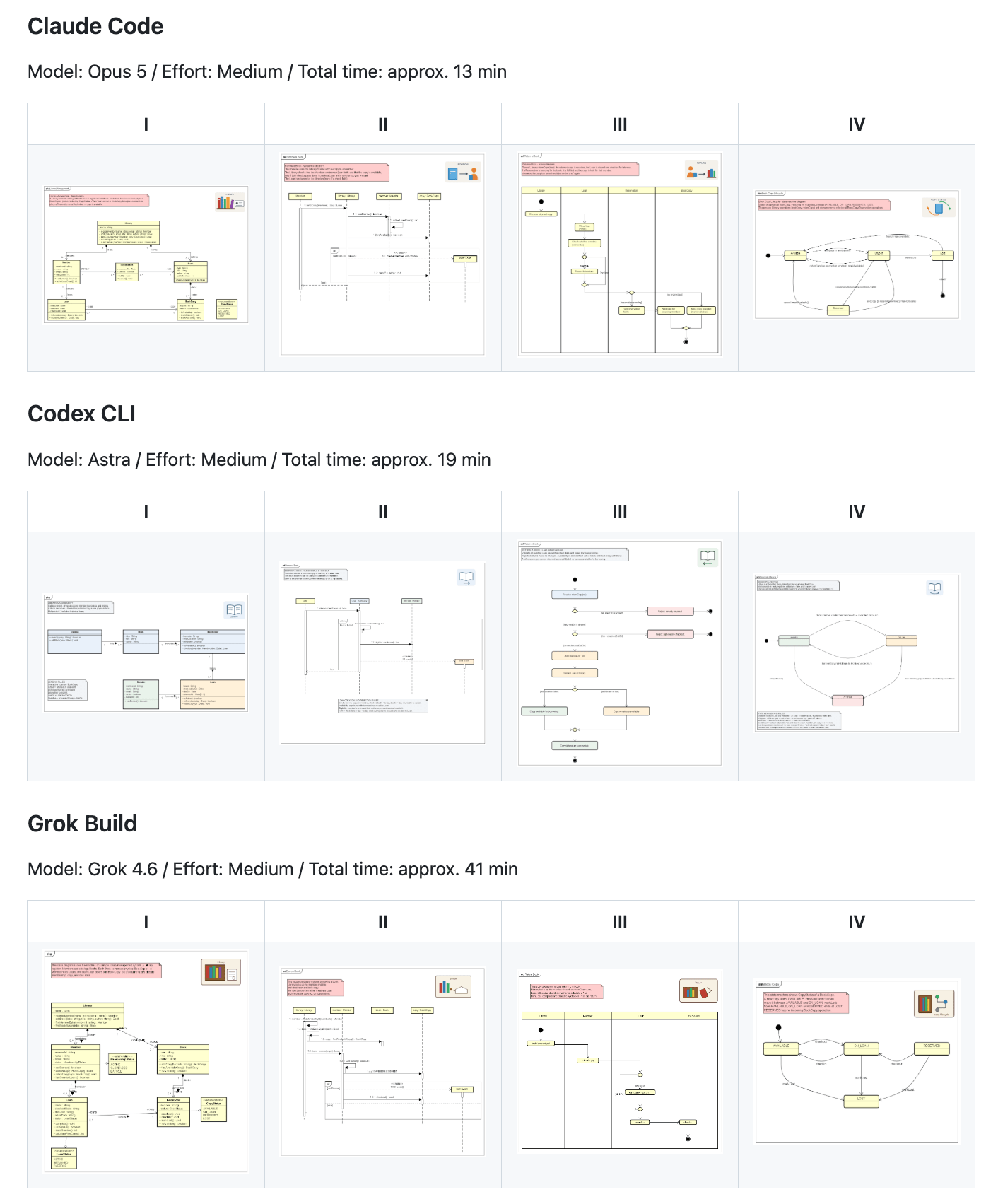
See the resulting diagrams from Claude Code, Codex CLI and Grok Build in the demo section of the README.
Important Notes:
- This project is currently experimental. The design and implementation may undergo breaking changes.
- This MCP server only connects to AI agents running on the same machine as Astah Professional.
- Astah project data and logs will be shared with the connected AI assistant/agent. If your project contains sensitive or confidential information, consider opting out or applying appropriate safeguards.
- Since the MCP server can modify your models and diagrams, we strongly recommend using version control (e.g., Git) or saving backups frequently.
- Some model/diagram properties may not be viewable or editable through the current API. Use Astah’s GUI to modify such elements.
- Token-saving techniques are not implemented. We recommend using a flat-rate AI service plan to avoid unexpected usage charges.
- As with code, AI-generated output may include errors or misinterpretations of your UML models.
- You may operate Astah through AI services or external applications only if you hold a valid license and use it for your own purposes. Allowing a non-licensed third party to operate Astah via such an agent is prohibited. Please refer to the official FAQ about the AI service usage.
Plugin Compatibility Table
| Plugin Version | Update | Compatible with | Download |
|---|---|---|---|
| 0.2.6 | 2026.7.06 | Astah Professional Version 11.0 |  |
| 0.1.5 | 2025.11.18 | Astah Professional Version 10.1 | |
About Support:
This plugin is developed and maintained by a user of Astah. For feature requests or bug reports, please contact the developer directly via the plugin’s GitHub Issues page. Because the project is in an experimental phase and may introduce breaking changes, the developer is not currently accepting pull requests.
For technical support, please directly contact the plug-in developer.