
FAQs

Get answers to your frequently asked questions about Astah SysML.

Setup and Uninstall
How can I install Astah SysML?
#
Please see the installation guide for your operating system:
How can I install Astah SysML in silent mode?
#
Use the /verysilent option. For example, to install Astah SysML 11.0:
astah-sysml-11_0_0-dc3ef9-jre-64bit-setup.exe /verysilent
To install Astah SysML to a specific folder, add the /DIR option:
astah-sysml-11_0_0-dc3ef9-jre-64bit-setup.exe /verysilent /DIR="the destination folder"
Note
- Save the license file (.lic) directly in the Astah SysML installation folder.
- If you have a Faculty Site License, rename the license file from
astah_faculty_license.lictoastah_faculty_sysml.licwhen you save it in the Astah SysML installation folder.
Where can I see the system requirements?
#
Please see the Astah SysML system requirements.
I have one Individual License for Astah SysML. Can I install it on a second computer?
#
As stated in the EULA, an Individual License allows you to install and use Astah SysML on one computer at a time.
To use it on another computer, first uninstall Astah SysML and remove the license file from the current computer. Then install and activate it on the other computer.
How can I move Astah SysML to a new machine?
#
- Before uninstalling Astah SysML, back up the following files and folders on your current machine, if you have them:
- Plugins: Userhome/.astah/sysml/plugins
- Customized system properties: Userhome/.astah/sysml/JudeY.properties
- Uninstall Astah SysML completely from your current machine.
- Download and install Astah SysML on your new machine.
- Copy the backed-up files to the same locations on the new machine.
- Log in to ChangeVision Members and download your license file from [My Licenses].
- Launch Astah SysML, go to [Help] – [License] – [Set License Key], and specify the license file.
How can I change the display language of Astah SysML to Japanese?
#
Astah SysML supports English and Japanese. It starts in English unless your PC’s language and region settings are Japanese. To switch to Japanese:
Windows
- Close Astah SysML if it is running.
- Open the
astahsysml.l4j.inifile in the Astah SysML installation folder with a text editor. - Add the following two lines and save the file:
-Duser.language=ja -Duser.country=JP - Launch Astah SysML. It starts in Japanese.
Mac
Astah SysML follows the language and region settings of macOS. If they are set to something other than Japanese, Astah SysML starts in English. To use Astah SysML in Japanese, set Japanese as the preferred language in [System Settings] – [General] – [Language & Region], then restart Astah SysML.
How can I uninstall Astah SysML?
#
Windows
- In the search box on the taskbar, type Control Panel and select it from the results.
- Select Programs > Programs and Features.
- Right-click Astah SysML (or press and hold) and select Uninstall or Uninstall/Change. Then follow the directions on the screen.
Mac
- Find Astah SysML in the Finder. It is usually in the Applications folder.
- Drag the app to the Trash, or select the app and choose [File] – [Move to Trash].
- If you are asked for a user name and password, enter the name and password of an administrator account on your Mac.
- To delete Astah SysML completely, empty the Trash.


Functionalities
Does Astah SysML work offline?
#
Yes. Astah SysML is a standalone desktop application and does not need an internet connection to run.
One optional feature connects to the internet: checking for software updates. To work completely offline, turn it off:
- Go to [Tools] – [System Properties].
- In the System Properties window, select [Basic] – [Other] on the left.
- Uncheck “Check for Software Updates when launching application”.
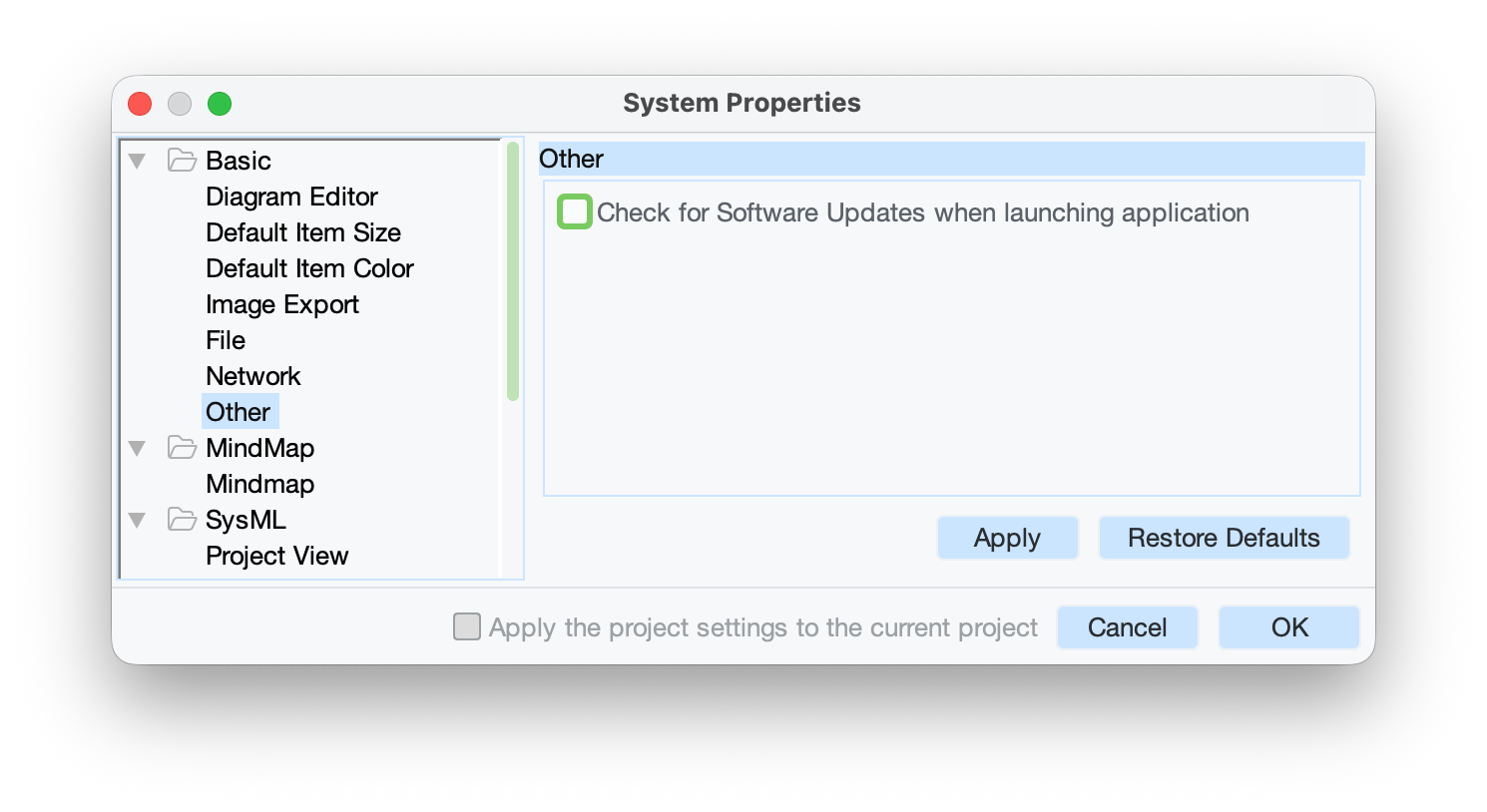
- Click [Apply], then [OK].
Astah SysML then works fully offline, without any internet access.
Can I create package diagrams with Astah SysML?
#
Yes. Create package diagrams with a block definition diagram. To show «import» and «access» between packages, draw the arrow with [Dependency] and add the stereotype.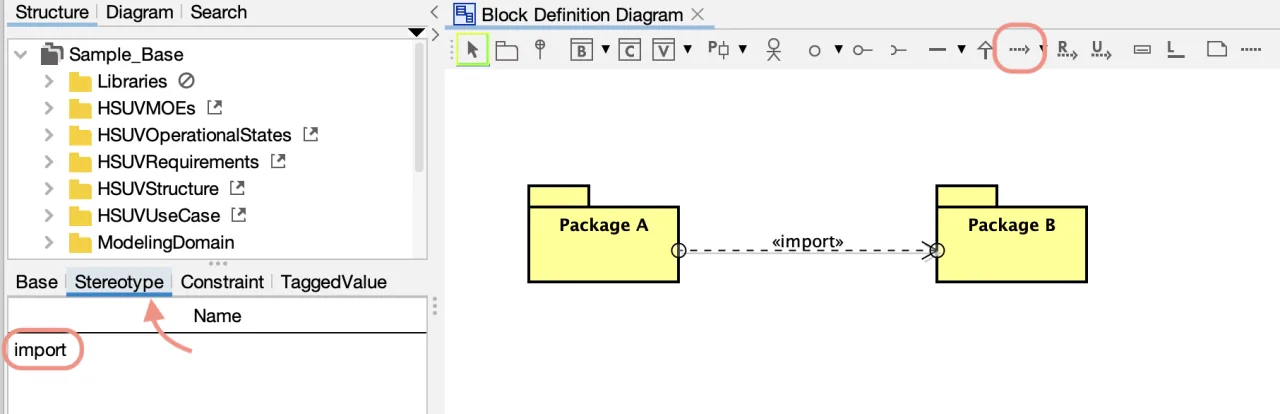
Can Astah SysML run simulations of SysML models?
#
No. Astah SysML does not run simulations of SysML models. You can use the Astah API to extract the model information you need and pass it to a separate simulation tool.
How can I change the font?
#
- Right-click the root package in the tree view.
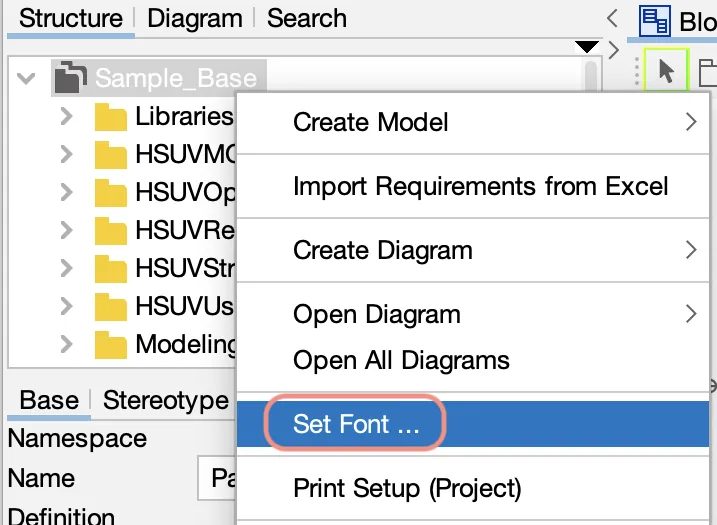
- The Font dialog opens. Set the font you want.

Can I paste diagrams into Microsoft Word, Excel, or PowerPoint?
#
Yes. There are two ways.
Export as an image file
- Go to [File] – [Export Image] in the main menu.
- Export the diagram as a BMP, PNG, EMF, or SVG file.
- Insert the image file into your Word, Excel, or PowerPoint document.
Copy to the clipboard
- Select the elements on the diagram.
- Go to [Edit] – [Copy to Clipboard] in the main menu.
- Paste into your Word, Excel, or PowerPoint document.
Image quality: vector formats (EMF and SVG) stay sharp when scaled, so they are recommended over BMP and PNG.
Note: ungrouping the pasted images in Word and Excel is not supported.
Can I export requirement tables to Excel?
#
Yes. There are two ways.
From the requirement table
- Open the requirement table.
- Click the [Export to Excel] button at the upper right of the table.

From the main menu
- Open a requirement table.
- Go to [File] – [Export] – [SysML Requirement Table to Excel].
Training and Consulting
Where can I find training services for Astah products?
#
We have partnered with several training and consulting companies that offer training for Astah products, both in person and online. See our partner page and contact a partner directly.
Troubleshooting
How can I improve the performance of Astah SysML?
#
The performance of Astah SysML depends on the memory (RAM) of your machine. Try the following:
1. Turn off the mouse cursor tracing option
In some environments, this option makes drawing on the diagram slower.
2. Tune the Java memory (heap size) settings
You can change when Java runs garbage collection with Java’s non-standard options.
Windows
- Close Astah SysML.
- Open the
astahsysml.l4j.inifile in the Astah SysML installation folder with a text editor. If you do not have permission to edit the file, open it as an administrator. - Set the heap size, save the file, and restart Astah SysML. For example:
-Xms16m
-Xmx512m
Mac
- Close Astah SysML.
- Open Terminal and run the following command (this example sets the maximum heap size to 2048m):
defaults write com.change-vision.astahsysml /com/change-vision/astahsysml/ -dict-add JVMOptions/ '{ "Xmx" = "-Xmx2048m"; }'
See also Why is Astah SysML running slowly?
Why is Astah SysML running slowly?
#
This can happen when many diagrams and tables are open at the same time. Close the ones you are not using. To close several at once, right-click a diagram or table tab and choose an option from the close menu.
Also make sure Astah SysML is up to date and that your computer meets the system requirements. If the issue continues, restart Astah SysML.