

New Features & Improvements
- Highlight the search result found by [Ctrl+F]
- Attach Note to Attributes/Operations with Note Anchor
- Start Astah from Exe format file
- Dashed line is now available for DataFlow in DFD
- More clear guidance in the result of diagram differences in [Compare Project] – [Show Diagram Difference]
- Launch [Compare Project] by command line
- Easier selection of text attached to the line
- [Apply to existing elements] button is added in the [Initial Visibility] tab of Class Diagram and Requirement Diagram’s property view.
- Show message in console when an error happened with C++ Reverse Program
- Launching of astah-command.sh is now in headless mode
- Easy access to nested/related Activity Diagram from Structure Tree
Mind Map
- Insert Mind Map Child Topic by [Tab] and a Parent topic by [Shift+Tab] key – Astah Shortcut Key List
- Locate Mind Map’s root topic in the center of the map (Was always shown in the top left)
- Better performance when moving Mind Map Topics to attach to others
- Scrolling Mind Map is available while creating a new topic by right-drag
API
- Now the Astah API can detect when a model is selected in the Structure Tree or Diagram Editor in real-time
- API extension for floating topics in Mind Map
- API extension for new models in Activity Diagram
- API extension for Note anchors for Attributes/Operations
- Now Shared line style of Generalization is available by API
- Now Shared line style of nested relationship is available by API
- Now Subtype relationship in ER diagram is available by API
- API now enables Plug-in to receive the selection of models with Event
Plug-ins
- Switching ON/Off of Plug-in is now available from “Plugins” dialog
- Supported edition and version for Astah can be specified in the Plug-in properties file now
- Now Plug-ins would be installed in the home directory
- Now more cases are supported for C++ Reverse Engineering Plug-in

Fixed Bugs
- [21] Scrolling by using mouse-wheel is rather slow on the System Properties
- [93] Unnecessary space is automatically included when exporting code
- [162] Mini Icon list does not appear in Java7
- [196] Astah cannot reverse the Java source code such as FastRemovalDequeue.Entry
- [217] Astah does not show the file name correctly in the [Reference Model Management] feature if it contains canonical compositions on Mac
- [223] Static Attributes defined as Association Ends would not be defined in exported CPP files
- [235] Memory keeps leaking even after closing a file
- [236] Saving a file fails if there is canonical compositions in a file path on Mac
- [239] It fails to obtain the Subtype relationship type of ER Diagram by API
- [240] When saving a file with another extension than .asta on Mac, a directory name will be automatically inserted in its filename
- [249] An exception error happens when creating a new Mind Map by using API with current Mind Map’s name
- [263] When merging projects, Realization’s parent operation detaches from its messages
- [270] An exception error may occur by moving a part of Structured Class in Composite Structure Diagram
- [304] Astah API does not handle the source and target of ER Diagram’s Subtype correctly
- [305] When creating ER Entity by using Astah API, they won’t be created in default size/color
- [315] Saving file with “Save as” with the same file name but in different upper case/lower case may fail sometimes
- [337] Copying and pasting ER Entity may fail only if ER Entity itself was selected without its relationships
- [394] Sometimes message’s sequence numbers cannot be changed in Communication Diagram
- [401] Moving a Node with a Component in does not change Component’s coordinate
- [421] Dragging a file into Traceability Map automatically creates a new topic
- [422] Incorrect Attributes get exported when exporting Java of Structured Class if it contains a Part does not have a Type
- [442] Copying and pasting of Association Classes with Objects create invalid models
- [467] Some model element names cannot get copied in full length to the Clipboard
- [473] If you include a file extension other than .asta in a file name once when saving a file, it will always appear in Mac every time saving a file
- [4732] Object Node’s property view does not appear when Object Node’s state is selected
- [4733] The Wrong message appears when exporting RTF in a path that is currently opened
- [4747] When selecting a hyperlink file, the canonical compositions in the file name will be automatically shown in canonical decomposition
- [4754] Copying Interface from another .asta and pasting it onto Class will lose its realization
- [4769] An exception error happens by dragging an association end from the Structure Tree to Communication Diagram in the editor
- [4771] It fails to select Attributes/Operations in the Class Diagram with the cursor
- [4806] Creating Requirements/Test Cases of Requirement Diagram by using API creates Models in Class
- [4831] The process never ends whilst using C# Reverse Engineering program
- [4842] [Compare project] does not function correctly when one of the projects contain Statemachine diagram which has orthogonal state
- [4846] Error message on exporting Entity Definition report does not appear correctly sometimes
- [4850] ER Domains cannot be copied and pasted correctly between .asta files
- [4851] Changing the color of models by using API without Plug-in does not work
Astah Professional 6.6.4
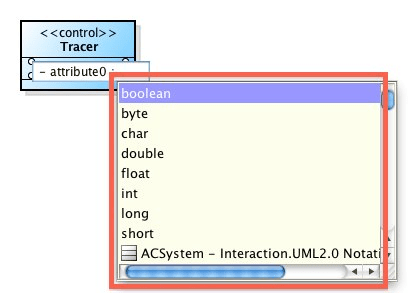
Content Assist for Type and Operations within Sequence Diagrams.. helps you model faster!
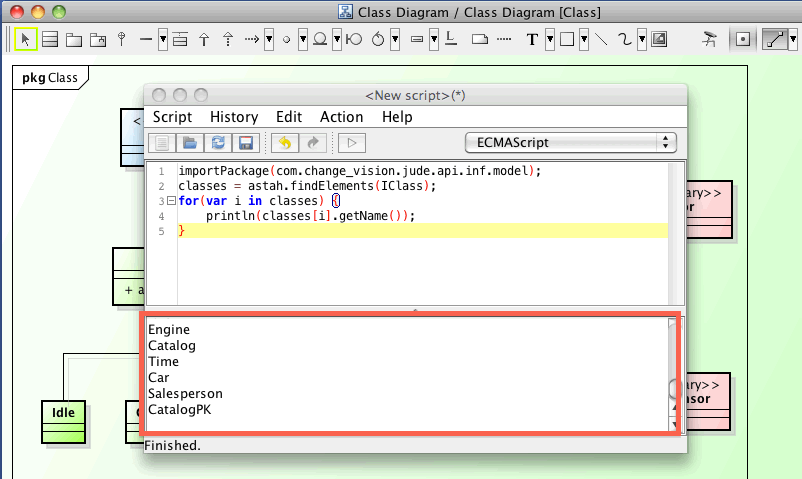
API Extension – More than 10 new API methods to access models. This is even easier with the free Script Plug-in.
Fixed Bugs
- [1973] Hyperlink setting (files) is not available after importing XML files.
- [1861] Using platform-dependent characters in Windows8 crashes Astah.
- [1828] [Export Java] export Class methods duplicated.
- [1586] Calling IAttribute.setComposite() could set incorrect values for Composite.
- [1572] An exception error occurs by setting an inappropriate Class for Template Parameter.
- [1571] Files won’t open by double-clicking .asta file on Linux if its file path contains space.
- [1337] Astah may not launch with any plug-ins stored under $USER_HOME/.astah.
- [1331] An exception error could occur while importing/editing Mind Maps.
- [1316] Command Line tool may fail sometimes on Mac.
- [1188] Nautilus and Astah icons are not associated on Linux.
- [1140] Mind Map branches get the wrong colors by pasting Mind Map from another file.
- [1093] Drag and drop doesn’t function for Sequence diagrams if it is selected with DiagramDropTargetListener
- [1086] createLinkPresentation(dependencyModel, supplierPs, clientPs) creates new dependencies.
- [1060] Cloning Mind Maps could cause an exception error.
- [1016] Activation of Node Count Licenses could fail on Mac.
- [961] Non-referenced models’s Pop-up menu appear grayed out.
- [898] Unable to convert ER Entity’s Attributes to Class’s Attributes.
- [880] Directory or file names do not appear completely on Mac with Java7.
- [714] An exception error occurs when creating a new mind map after failing the import of XMI file.
- [629] [Ctrl+B] and [Ctrl+I] keys do not function on Requirement Table.
- [607] Deleting ER models could throw an exception error.
- [601] Appearance of Node in Mind Map topics gets garbled in the Structure tree.
- [585] Merging models after moving a Requirement to another Requirement could generate invalid models.
- [581] [582] [583] Copying and Pasting State Invariants/ InteractionUse/ CombinedFragments over .asta files could generate invalid models.
- [578] Merging files from [Reference Model Management] when diagrams are open in Diagram Editor could throw an exception error.
- [551] MIME Type of .asta file specified in Linux is incorrect.
- [540] Unable to convert Association Classes to Associations if the Association Classes have self-association to SubSystem.
- [533] Classes with the same name can be created incorrectly under SubSystem by dragging and dropping the classes from the Structure Tree to diagram.
- [524] Suggest feature doesn’t appear for Messages in Sequence diagram.
- [485] Importing Java files with [Subdirectory] option checked freezes Astah.
- [479] [Shift+Enter] doesn’t function to create new Attributes on Mac.
- [468] Charset option on [CSV Export] dialog does not function.
- [257] Alias view does not expand at all on Mac.
- [236] Saving files fails on Mac if the file patch includes canonical compositions.