
Office Integration
Embed Astah diagrams directly in documents of the Microsoft Office products (Word and Excel..etc).


How to Install
* Silent installation is currently not supported.
- Download the plug-in file.
- Run the downloaded .msi file to start the installation.

- Install it in the Astah installation folder, then click [Next].

- Click [Install].

- When the completion dialog appears, click [Finish].

- Launch Astah. If [OfficeBridge] appears in the main menu, the installation is complete.

How to Use
This example uses Excel.
* The plug-in’s menu labels in Microsoft Office currently appear in Japanese only. See the translations below.
- Launch Astah and open the diagram you want to embed in the document.
- Launch Excel and go to [Insert] – [Object].

- Choose [Astah Diagram] as the object type and click [OK].

- If Astah is not running, a pop-up asks you to launch it. Click [Yes] (the left button).

- In Astah, open the diagram you want to send to the Office document and save the file if you haven’t yet. Then go to [OfficeBridge] – [Update Diagram].

- The diagram is embedded in the Excel spreadsheet.

When you change the diagram later, go to [OfficeBridge] – [Update Diagram] in Astah to update the embedded diagram.
The embedded diagram stores the path of the linked .asta file and the diagram ID in the document. To choose whether the path is saved as an absolute or relative path, right-click the embedded diagram and select [AstahDiagram – Object] – [設定] (Configuration). See the translation of the Configuration window and what this menu offers in English.

Translation
The plug-in’s menu labels in Microsoft Office currently appear in Japanese only. Here are the translations. If you have any questions, please contact us.
Astah Diagram Object Menu

(1) Edit
Click [Edit] to open the embedded diagram in a separate window.

- The [Edit] and [View] menus do nothing.
– [File]
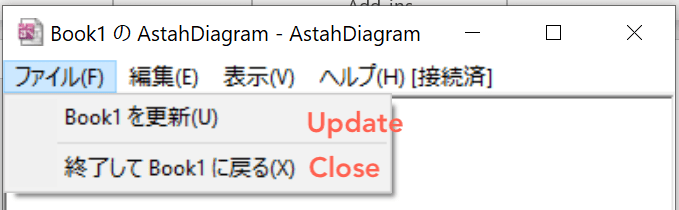
- [Update] updates the diagram.
- [Close] closes the window.
– [Help]

- [Connect to Astah]: same as (2) Connect to Astah.
- [Update Diagram]: same as (3) Update Diagram.
- [Configuration]: same as (4) Configuration.
- [About this Plug-in]: same as (5) About this Plug-in.
(2) Connect to Astah
Reconnects to Astah if the connection was lost.
(3) Update Diagram
Asks Astah to send the latest version of the diagram to the document.
(4) Configuration
Choose whether the path to the linked .asta file is saved as an absolute path or as a path relative to the document. Set the default in the area marked (1), and the setting for each diagram in the area marked (2).

* The port number shown here is the one set in Astah and cannot be changed here.
(5) About this Plug-in
