
AI Code Reverse


AI Code Reverse
Astah Professional and Astah UML (Version 11 and later) supercharge your reverse engineering capabilities using built-in AI assistance. AI Code Reverse automatically constructs UML Sequence Diagrams and translates multi-language source code into accurate visual structures, helping you master unfamiliar codebases in seconds.
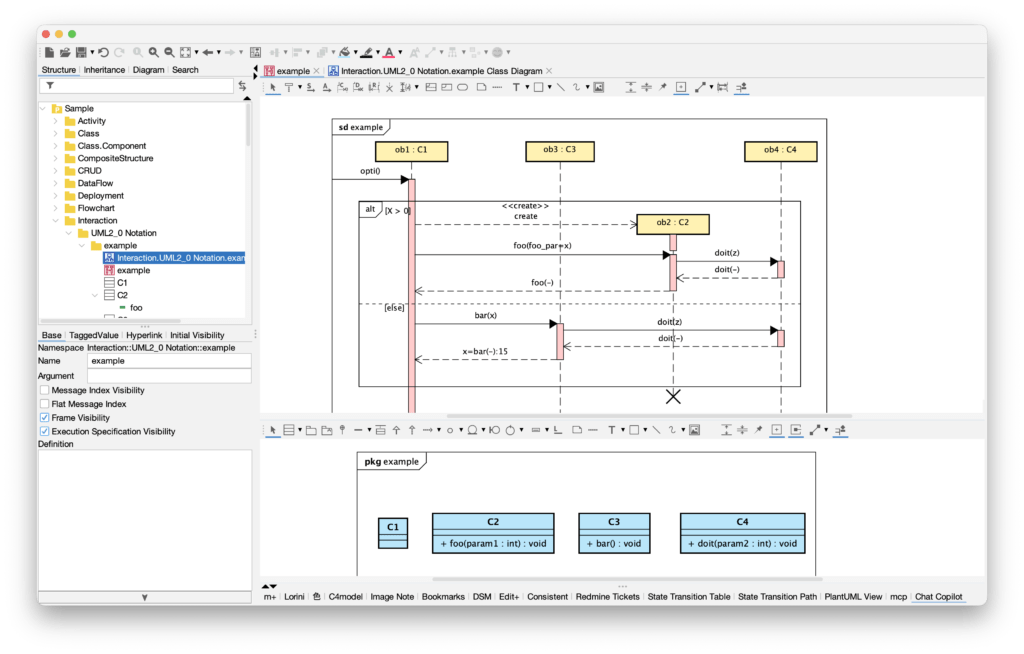
- AI Code Reverse uses an external AI service you select. Astah itself does not perform AI processing, nor does it learn from or analyze user data.
- To use AI Code Reverse, a valid API key must be configured. If the API key is not configured correctly, AI Code Reverse will not function.
Key Features
1. Class Diagram Generation
Automatically generates UML Class Diagrams from source code in languages such as Java, C#, C++, C, Python, Go, TypeScript, and more. (→ Jump to Class Diagram Generation)
2. Sequence Diagram Generation
Automatically generates UML Sequence Diagrams based on the actual execution flow of the code to support deeper analysis. (→ Jump to Sequence Diagram Generation)
Supported Programming Languages
The following languages are supported:
- Java: Full support for classes, interfaces, enums, annotations, generics, etc.
- C#: Supports .NET Framework and .NET Core / .NET 5+ projects
- Python: Supports Python 3 constructs such as classes, decorators, and type annotations
- TypeScript: Supports interfaces, generics, decorators, and TypeScript-specific features
- Go: Supports structs, interfaces, method receivers, and more
- C++: Supports classes, templates, namespaces, and C++ language features
- JavaScript, Kotlin, Swift, PHP, Ruby, Rust, and others
Use Cases
Scenario 1: Understanding an Existing System
- Quickly generate visual architecture diagrams when onboarding to a project
- Help new engineers grasp the overall flow when reading code is difficult
- Understand complex branching or exception handling and method call relationships
Scenario 2: Debugging and Issue Analysis
- Difficult-to-locate bugs that span multiple methods
- Unclear execution order or call chain
- Suspected gaps between implementation and design documentation
Scenario 3: Impact Analysis for New Features
- Understand collaboration between classes required for a new feature
- Identify where existing methods are referenced across the codebase
- Visualize execution flow for specific use cases
Configuration
AI Service Settings
Before using the plugin, configure the API settings for your AI service.
Supported AI Models
- OpenAI – GPT-5, GPT-5.1, GPT-4 series
- Anthropic Claude – Claude 4 series (Opus, Sonnet, Haiku)
- Google Gemini – Gemini Pro, Gemini Flash, Gemini 2.5 series
- Other OpenAI-compatible services – Any custom service using OpenAI-compatible APIs
Setup Steps
- Open the Settings Screen
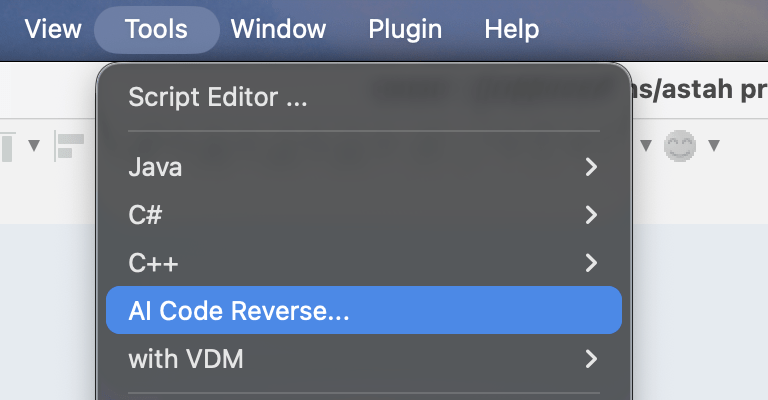
- In Astah, go to Tools → AI Code Reverse
- The AI Code Reverse dialog will appear, click Option
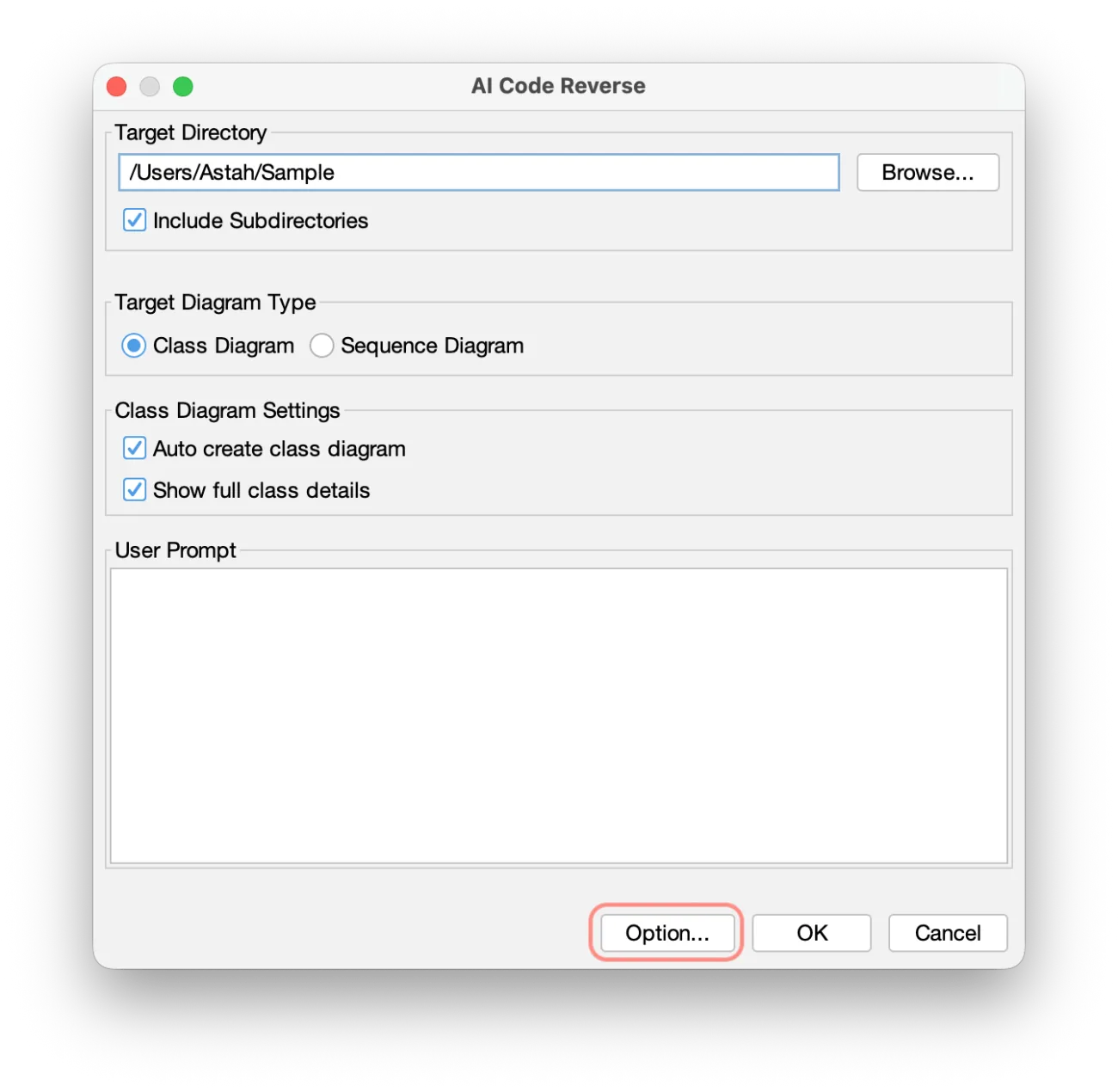
- In Astah, go to Tools → AI Code Reverse
- Add or Edit API Configuration
- Open a drop-down list for Current Configuration – this has a default set of AI services.
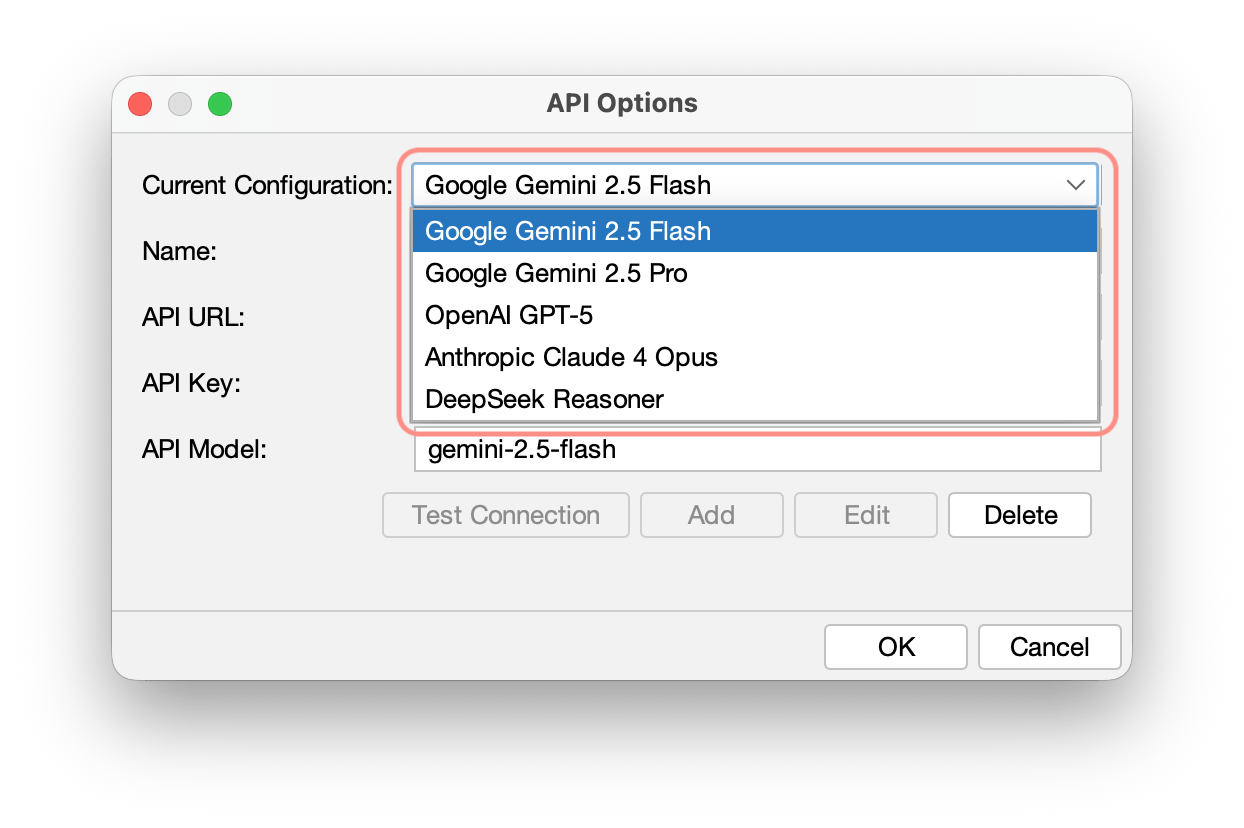
- Enter the following information then click Add. The Add button does not work unless you enter Name.
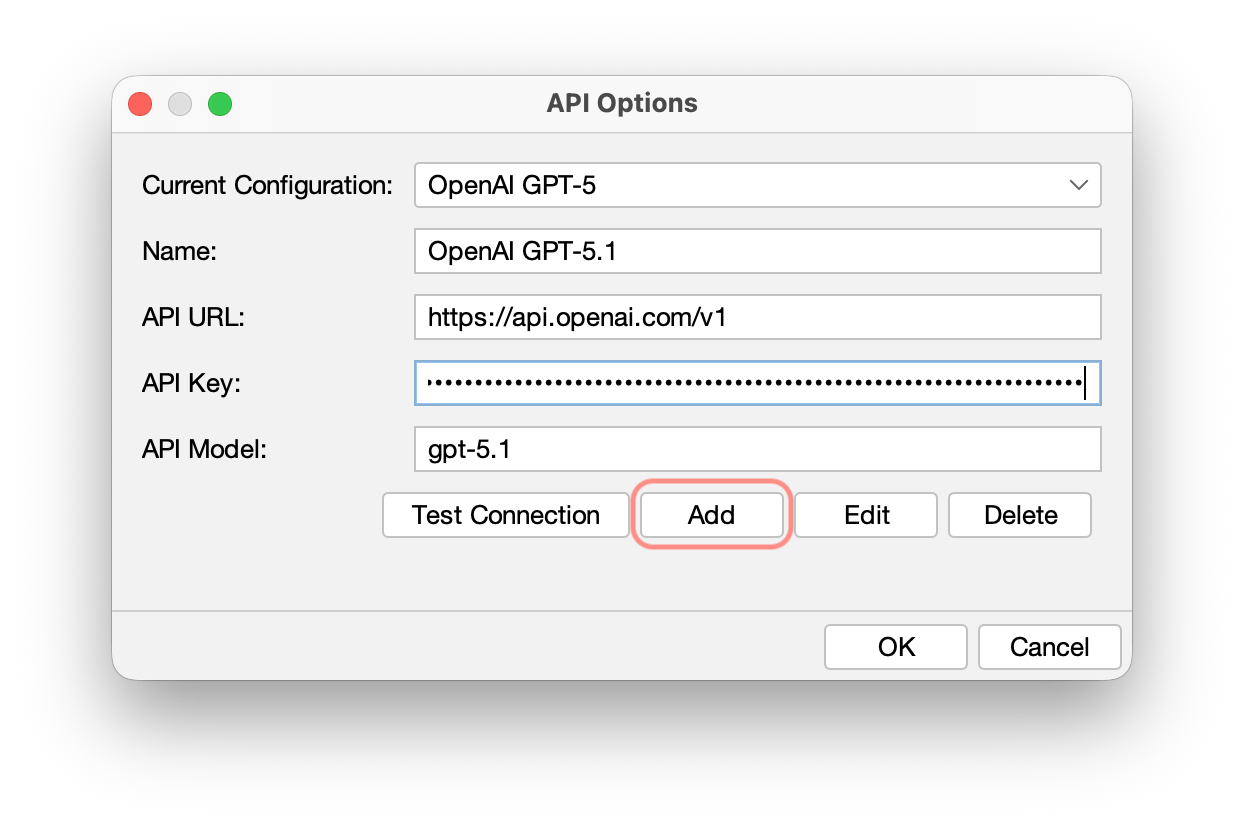
- Configuration Name: Custom name
- API URL: Endpoint URL of the AI service
- API Key:
Enter the API key for the AI service.
Generate and obtain your API key from your AI service provider. - Model Name: Name of the AI model (e.g., gpt-5.1, claude-opus-4-1-20250805, gemini-2.5-pro)
- Open a drop-down list for Current Configuration – this has a default set of AI services.
- Test the Connection
- Click Test Connection to verify configuration correctness
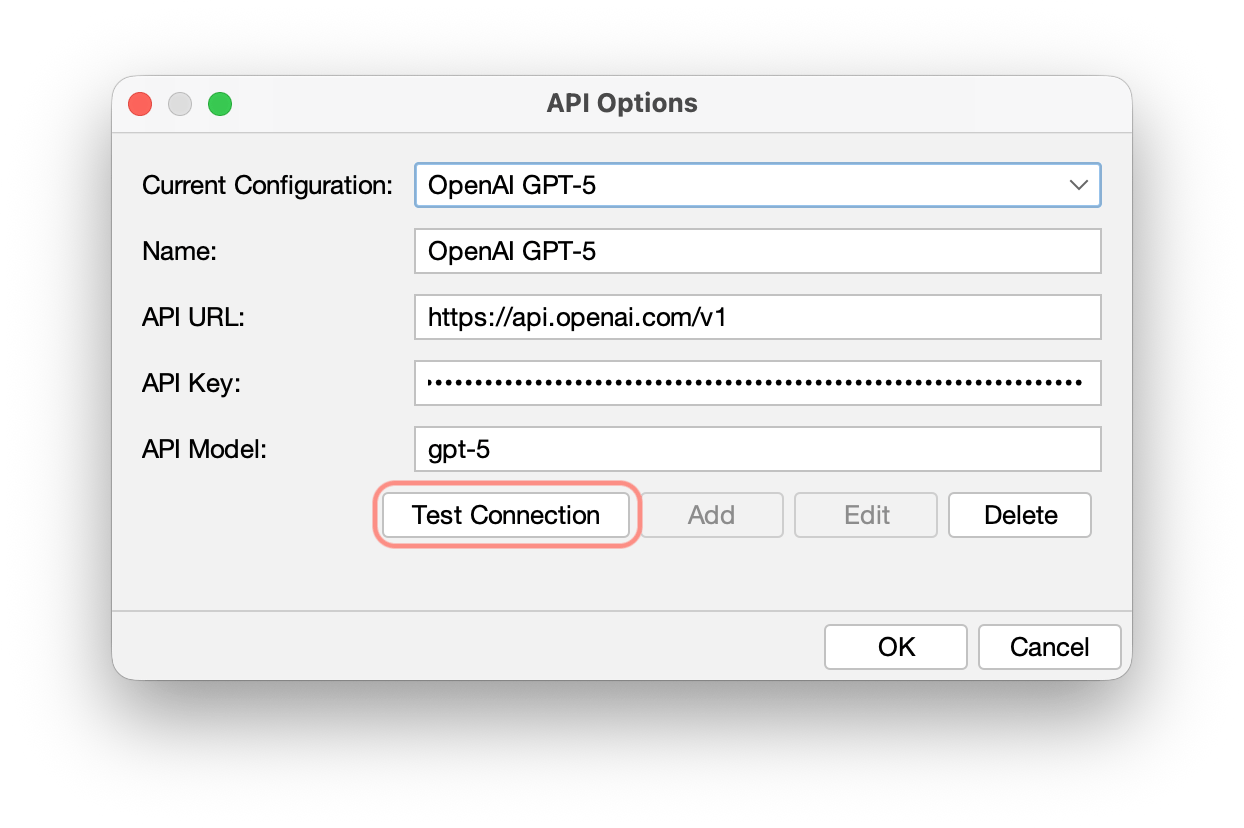
- Click Test Connection to verify configuration correctness
- Click OK to save changes.
Large Project Best Practices
To ensure a smooth experience and prevent data loss due to memory limitations, please follow these recommendations when processing large source code bases:
Increase JVM Memory: Before starting, increase Astah’s maximum heap size.
- Open
astah-pro.l4j.iniin the Astah installation folder. - Change
-Xmx1024mto a higher value (e.g.,-Xmx4096m). - Restart Astah.
Process Incrementally: Instead of reversing the entire solution at once, select specific sub-directories or modules.
Save Frequently: Save your .asta project file after each successful module reversal.
Note on API Costs: AI processing consumes tokens based on the volume of code. Large-scale operations can result in significant API provider charges. We recommend starting with a small subset to verify results first.
Class Diagram Generation
💡 Before You Start:
Reversing large codebases is resource-intensive. To prevent memory failure and data loss, please review our Best Practices for Large Projects and Notes, Cautions, and Safe Use section below.
Steps to Generate a Class Diagram
- Open the Dialog
- Go to Tools → AI Code Reverse
- The AI Code Reverse dialog opens
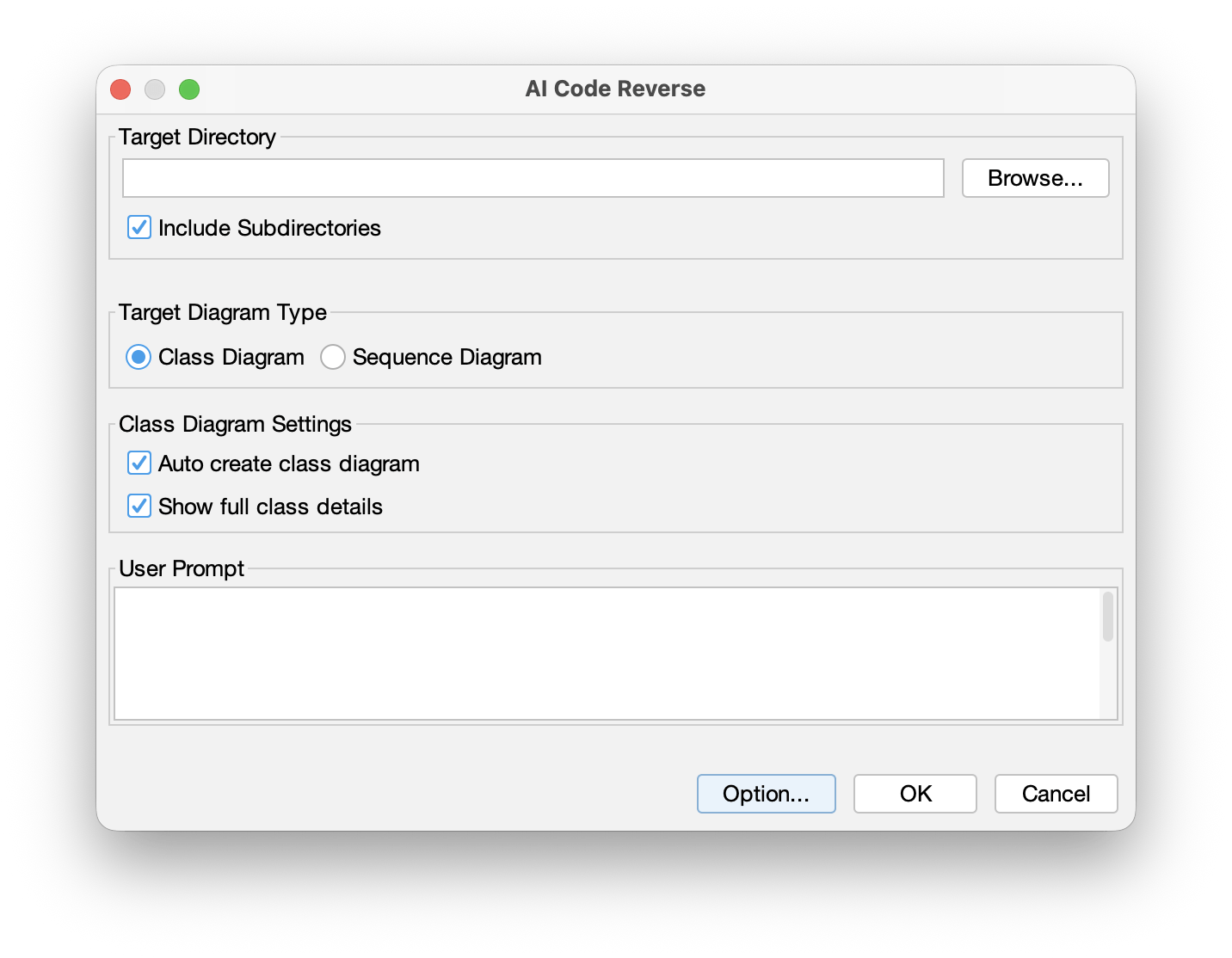
- Go to Tools → AI Code Reverse
- Select Target for Analysis
- Target Directory: Choose the directory containing source files (multi-language projects are supported)
- Include Subdirectories: Enable if needed
- Choose Diagram Type
- Under Target Diagram Type, select Class Diagram
- Under Target Diagram Type, select Class Diagram
- Set Generation Options
- Auto create class diagram: Automatically create class diagrams per package/namespace (recommended OFF for large projects; you can generate diagrams manually afterward)
- Show full class details: Generate more detailed diagrams with the appearance of classes, attributes, and operations.
- User Prompt: Enter custom instructions (e.g., “Ignore all non-public members”)
- Start Generation
- Click OK to begin analysis.
- The AI analyzes the code and generates a UML static model (classes, attributes, operations, inheritance, interfaces, associations, etc.).
- Ensure to enable auto create class diagrams to generate diagrams automatically.
Reversing Rules for Class Models
Based on field types, AI Code Reverse will intelligently determine whether to model something as an attribute or an association.
- Modeled as attributes:
- Primitive types
- Strings
- Enums
- Collections of value types (e.g., List<string>, Map<string, int>)
- Modeled as associations:
- User-defined types
- Collections of user-defined types
- Arrays of user-defined types

Sequence Diagram Generation
💡 Before You Start:
Reversing large codebases is resource-intensive. To prevent memory failure and data loss, please review our Best Practices for Large Projects and Notes, Cautions, and Safe Use section below.
Steps to Generate a Sequence Diagram
- Open the Dialog
- Go to Tools → AI Code Reverse
- The AI Code Reverse dialog opens
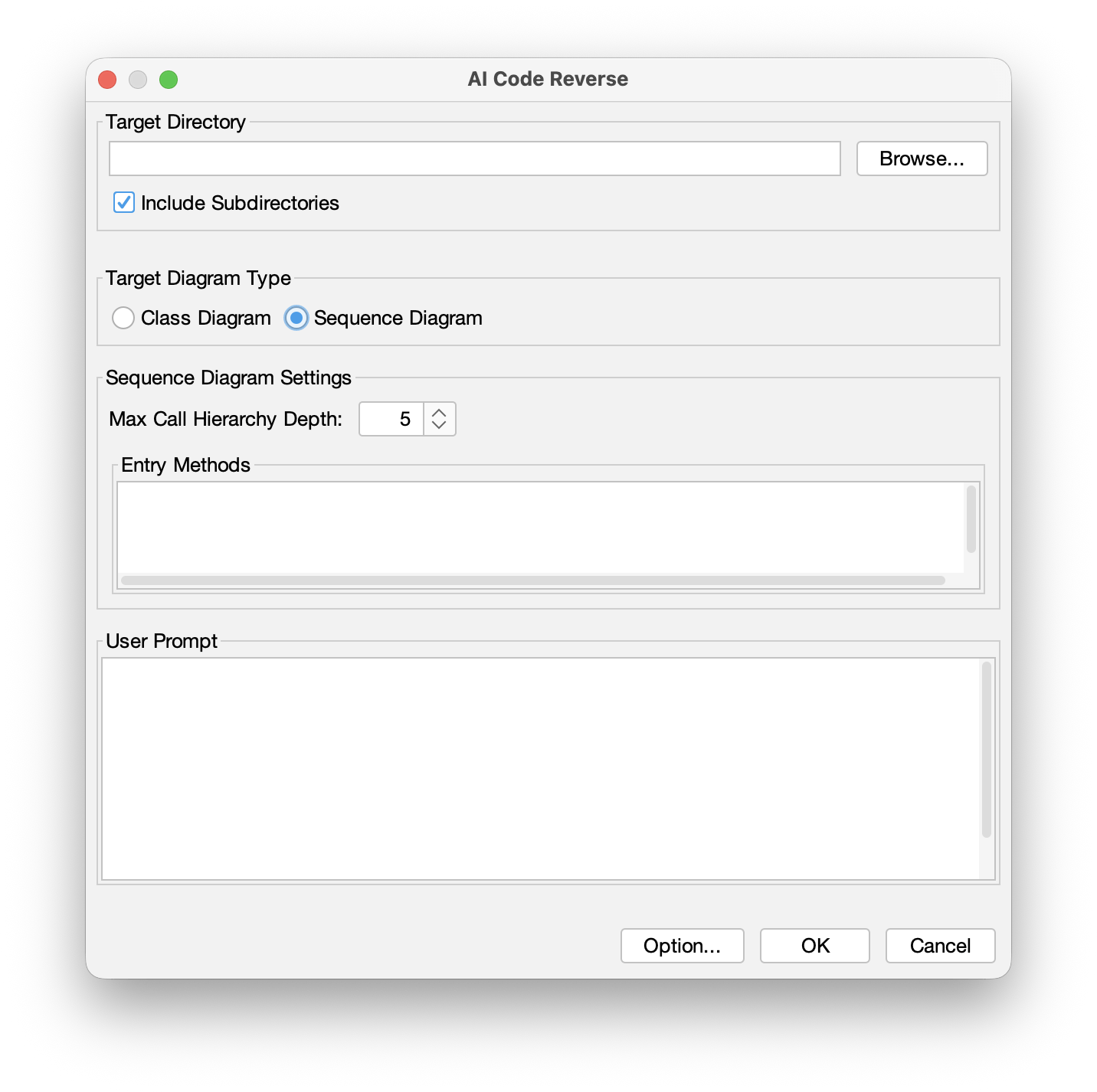
- Go to Tools → AI Code Reverse
- Select Target for Analysis
- Target Directory: Choose the directory containing source files (multi-language projects are supported)
- Include Subdirectories: Enable if needed
- Choose Diagram Type
- Under Target Diagram Type, select Sequence Diagram
- Under Target Diagram Type, select Sequence Diagram
- Set Sequence Options
- Entry Methods (optional): e.g., OrderService.processOrder
- Leave blank to allow automatic detection
- Learn more about Entry Methods
- Max Call Hierarchy Depth:
You can specify the maximum message-call depth for the generated diagram.
Recommended 3–10 - User Prompt: Custom analysis rules (e.g., “Ignore all logging calls”)
- Entry Methods (optional): e.g., OrderService.processOrder
- Start Generation
- Click OK
- The plugin analyzes the program flow and generates the Sequence Diagram
Reversing Rules for Sequence Models
Specifying an Entry Method
You can specify an “entry method” to let AI know which method to start to reverse.
You can analyze the execution flow of a specific method (e.g., PaymentService.process()).
If you don’t specify the “entry method”, AI automatically detects an appropriate starting point, such as:
- Web framework entry points
- Spring Boot @RestController
- Flask @app.route
- Express app.get()
- Public API methods
- Key business logic methods
- Test entry points
- Unit test or integration test methods
TIPS:
Start by leaving the Entry Methods field blank to allow automatic detection, then refine the analysis by specifying a method.
Multi-Language Call Chain Tracking
The AI can follow cross-language call chains (e.g., Java → Python → Go) and generate multi-language Sequence Diagrams.
Troubleshooting
Issue: Multi-Language Analysis Is Inaccurate
Check:
- Check if the programming language version is supported
- Provide clearer user prompts
- Try a different AI model
Issue: Multi-Language Call Tracking Fails
Check:
- Ensure all related source code is within the analysis directory.
- Confirm that network calls use standard protocols (REST, gRPC).
- Specify the entry method and call path manually.
Issue: Out of Memory in Large Projects
Solution:
- Increase Astah’s JVM memory allocation.
- Analyze modules separately instead of the entire project at once.
Usage Tips
- We recommend starting with smaller projects that use a single programming language.
- Adjust your prompts based on the generated output and gradually refine them to improve results.
Notes, Cautions, and Safe Use
Handling Confidential Information
- The handling of information sent to AI services varies depending on the service used and the applicable contract terms. Please review the terms of use, data policies, and settings of each AI service before using it.
Backup Recommendation
- Before editing models with AI, we strongly recommend creating a full backup of the project.
About AI-Generated Content
- AI-generated content may not always be complete, correct, or consistent.
- Always review the output carefully and revise it as needed.
- Unexpected behavior or issues may occur depending on your prompts, model settings, or service status.
Token Limitations
- AI services have an upper limit on the number of tokens they can process.
- Sending or receiving very large specifications or model data in a single request may:
- Reduce response quality
- Cause timeout or errors
- Make processing unstable
- Try to adjust your prompts so that the exchanged information does not become excessively long.
Version & Update Information
AI Code Reverse is maintained as an integrated plugin component. Refer to the list below for the current latest version information corresponding to your Astah edition and version. The appropriate AI Code Reverse plugin version comes pre-bundled with the respective Astah version mentioned below:
- Astah Professional and UML v12 / AI Code Reverse v1.1.0 (This is also compatible with Astah Professional and UML v11.)
- Astah Professional and UML v11 / AI Code Reverse v1.0.0
How to Update AI Code Reverse
- Download the latest AI Code Reverse .jar file.
- Drag and drop the .jar file into the Astah window while Astah is running.
- Restart Astah to apply the update.
Current Version Information
- Latest Version: 1.1.0 (Released on July 15, 2026)
- Bundled Astah Version: Astah Professional / Astah UML Version 12
- Compatible with: Astah Professional / Astah UML version 11 and later
How to Check Your Installed AI Code Reverse Version
- Open [Plugin] → [Installed Plugin].
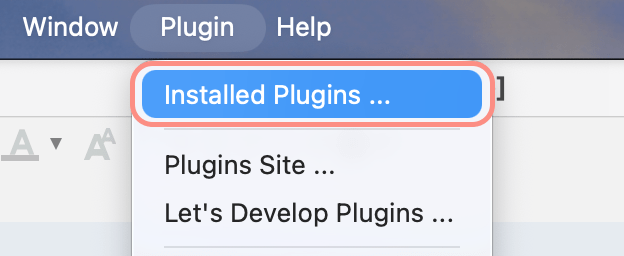
- A list of installed plugins will appear.
- Locate “AI Code Reverse” and check the Version column.
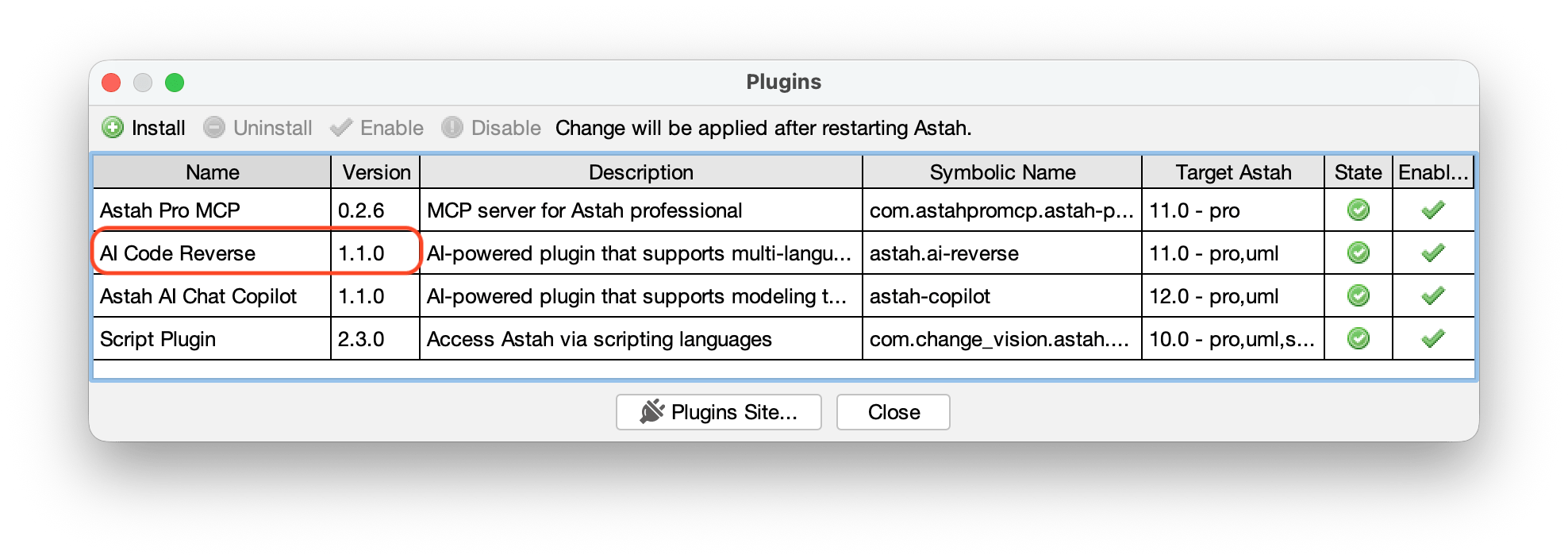
How to uninstall AI Code Reverse
- Open [Plugin] → [Installed Plugin].
- A list of installed plugins will appear.
- Locate “AI Code Reverse” and click [Uninstall].
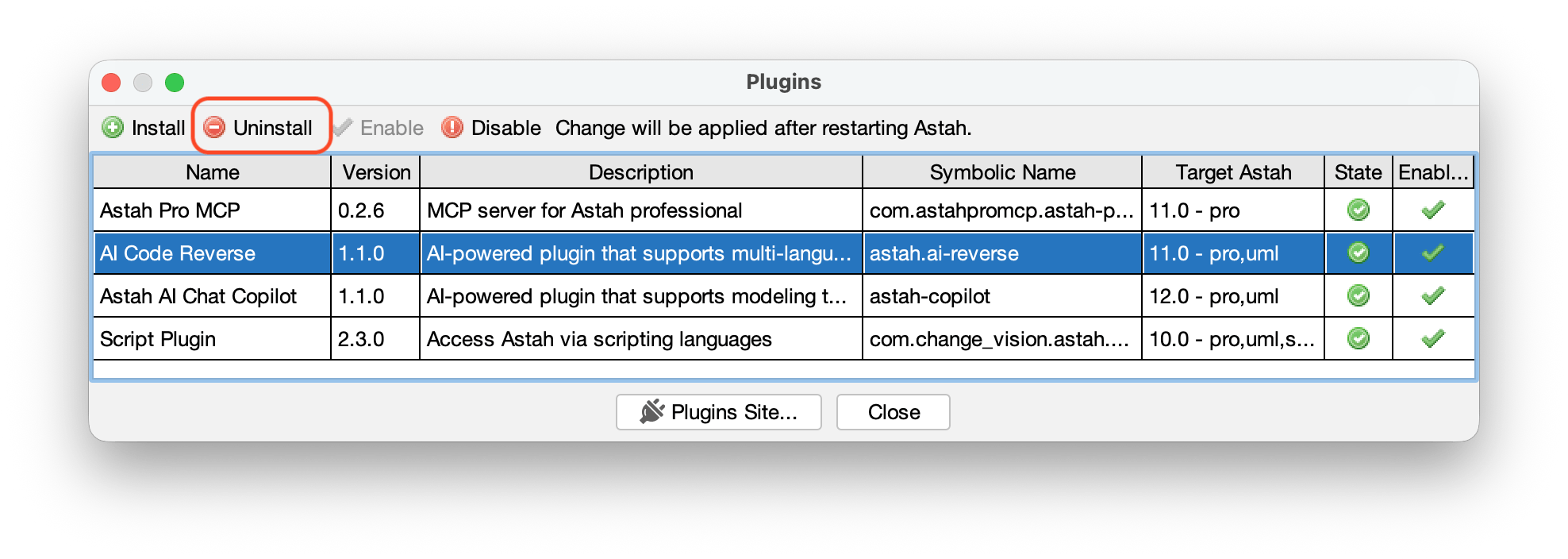
- Restart Astah.